Sponsored

Two Phone Solution?

spazzyfry123

Well-Known Member
First Name
Tyler
Joined
Aug 1, 2025
Threads
12
Messages
226
Reaction score
298
Location
North Georgia Mountains
Vehicle(s)
Ranger Raptor
Those out there that have multiple phones, is there a way to have the truck swap between them? I've got my personal phone and my work phone, but I'll often take calls from both while I'm in the truck. Both are set as phones that are readily connected, and it is seemingly a coin flip as to which one the truck will connect to (to be fair, it connects to my personal phone more often, but I really don't know what it will do when I start the truck up as there have certainly been times it decided to connect to my work phone that day for whatever reason).

As a scenario from yesterday, I was connected to my personal phone and using it for CarPlay. I got a message from one of my guys on my work phone to see if I could take a call. I COULD NOT figure out how to swap over to my work phone - ultimately just talked to him on speaker phone with the work phone in my hand while the truck stayed connected to my personal phone.

Ideal scenario would have my primary phone of choice always be selected/connected as primary (for apps, CarPlay), but if a call/text/Teams/whatever came through on my work phone that it would still cycle through the truck.

Alternate would be a super simple and safe way to toggle between phones should they not be able to be actively connected at the same time.

This is for my '25 Ranger Raptor if that makes any difference. I'm sure I'm missing something simple, but dang...

Thoughts? Thanks!
Sponsored
 

sikedsyko

Well-Known Member
Joined
May 16, 2023
Threads
9
Messages
274
Reaction score
282
Location
Texas
Vehicle(s)
24 RRaptor, 05 Z4
You would have to open the truck's phone list and select the 2nd phone to make it active. I don't think its possible to have 2 phones "active" at the same time for seamlessly taking calls from both.

As far as which phone it defaults to, it should be the last active phone, unless it doesn't detect the last active phone it will go to the secondary.

Its probably not the solution you want, but I think the only seamless way to take calls from 2 phone numbers via Sync would be to run dual sims on a single phone.
 
OP
OP

spazzyfry123

Well-Known Member
First Name
Tyler
Joined
Aug 1, 2025
Threads
12
Messages
226
Reaction score
298
Location
North Georgia Mountains
Vehicle(s)
Ranger Raptor
You would have to open the truck's phone list and select the 2nd phone to make it active. I don't think its possible to have 2 phones "active" at the same time for seamlessly taking calls from both.

As far as which phone it defaults to, it should be the last active phone, unless it doesn't detect the last active phone it will go to the secondary.

Its probably not the solution you want, but I think the only seamless way to take calls from 2 phone numbers via Sync would be to run dual sims on a single phone.
Thanks!

Strange on the "default" active phone. I recently had one where I left my work phone inside the house (and it hadn't been connected to the truck for a couple days), my personal phone in my pocket, and it somehow connected to my work phone. Any way, not looking to pile on topics - likely a fluke.

I must be a fool. I cannot for the life of me find the truck's phone list once a phone has connected and is active. If I catch it before it has completed the connection, I can click the prompt that's displayed and choose what I want. But I cannot figure out where to navigate if I want to change it on the fly - in yesterday's example I needed to make the change 10-15 minutes into the drive.
 

pasali

Well-Known Member
First Name
Paul
Joined
Feb 4, 2025
Threads
3
Messages
111
Reaction score
207
Location
Livermore CA
Vehicle(s)
2024 Ranger Raptor Oxford White
Occupation
Carpenter
You can take calls from both phones, but if you connect one of them to CarPlay the other drops out. If both phones are only connected to Bluetooth (not CarPlay) they will both take calls. I have this issue in both my ‘24 RR and my ‘23 F150 work truck.
 
OP
OP

spazzyfry123

Well-Known Member
First Name
Tyler
Joined
Aug 1, 2025
Threads
12
Messages
226
Reaction score
298
Location
North Georgia Mountains
Vehicle(s)
Ranger Raptor
You can take calls from both phones, but if you connect one of them to CarPlay the other drops out. If both phones are only connected to Bluetooth (not CarPlay) they will both take calls. I have this issue in both my ‘24 RR and my ‘23 F150 work truck.
I will always be using CarPlay. I would say without exception.
 

Sponsored

JimG

Well-Known Member
First Name
Jim
Joined
Aug 29, 2025
Threads
7
Messages
163
Reaction score
186
Location
Scottsdale, AZ
Vehicle(s)
2025 Ford Ranger Raptor
Occupation
Retired
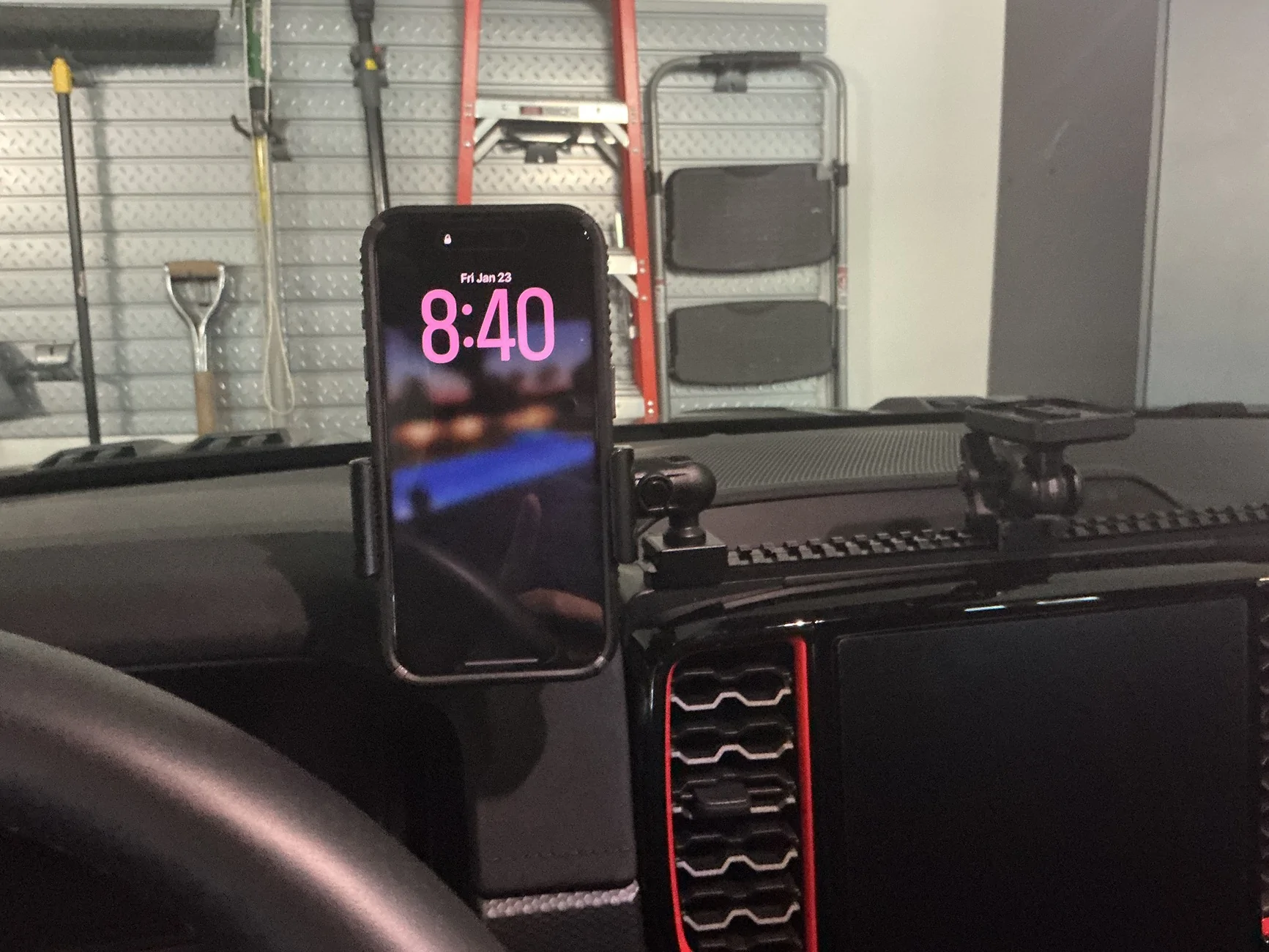
You say that your personal phone is primary phone used in your truck. Make that phone hook up to bluetooth. The with Tackform or a similar phone mounting setup you can have 1 or both phones mounted to your dash. I have one as shown in the picture. I know it’s expensive, but a lot cheaper than an accident.
Ford Ranger Two Phone Solution? IMG_0047
If your business phone ring just answer it and use the speaker instead of Bluetooth. Both would be hands free. With the mount up at your dash you also have good visibility your phone without looking down. Hope this helps.
 
OP
OP

spazzyfry123

Well-Known Member
First Name
Tyler
Joined
Aug 1, 2025
Threads
12
Messages
226
Reaction score
298
Location
North Georgia Mountains
Vehicle(s)
Ranger Raptor
You say that your personal phone is primary phone used in your truck. Make that phone hook up to bluetooth. The with Tackform or a similar phone mounting setup you can have 1 or both phones mounted to your dash. I have one as shown in the picture. I know it’s expensive, but a lot cheaper than an accident.
IMG_0047.webp
If your business phone ring just answer it and use the speaker instead of Bluetooth. Both would be hands free. With the mount up at your dash you also have good visibility your phone without looking down. Hope this helps.
Been down that road before. Definitely trying to avoid this type of scenario.

I've been tinkering with the truck and I am still at a total loss as to how to swap to another sync'd phone, but not yet connected for active use. The only way I can find it is if I grab it before the truck makes its connection. Any pointers?
 

JimG

Well-Known Member
First Name
Jim
Joined
Aug 29, 2025
Threads
7
Messages
163
Reaction score
186
Location
Scottsdale, AZ
Vehicle(s)
2025 Ford Ranger Raptor
Occupation
Retired
Been down that road before. Definitely trying to avoid this type of scenario.

I've been tinkering with the truck and I am still at a total loss as to how to swap to another sync'd phone, but not yet connected for active use. The only way I can find it is if I grab it before the truck makes its connection. Any pointers?

Steps to Prioritize Phones in a 2025 Ford:
  1. Park the vehicle and turn on the power.
  2. Navigate to Settings on your touchscreen.
  3. Select Bluetooth or Connections.
  4. View your paired devices and find the option to "Prioritize Device" or set a "Favorite".
  5. Select the desired phone to make it the primary device for calls and audio.
Page 502 in the owners manual tells you how to switch back & fourth between phones. Probably a pain in the ass. Having a way to toggle back and fourth on the main screen seems simple but so far I don’t know of any manufacturers that have done so.
 
OP
OP

spazzyfry123

Well-Known Member
First Name
Tyler
Joined
Aug 1, 2025
Threads
12
Messages
226
Reaction score
298
Location
North Georgia Mountains
Vehicle(s)
Ranger Raptor
Steps to Prioritize Phones in a 2025 Ford:
  1. Park the vehicle and turn on the power.
  2. Navigate to Settings on your touchscreen.
  3. Select Bluetooth or Connections.
  4. View your paired devices and find the option to "Prioritize Device" or set a "Favorite".
  5. Select the desired phone to make it the primary device for calls and audio.
Page 502 in the owners manual tells you how to switch back & fourth between phones. Probably a pain in the ass. Having a way to toggle back and fourth on the main screen seems simple but so far I don’t know of any manufacturers that have done so.
I see what is listed there on 502 now, thanks. As I see it...

  1. Go to the settings menu
  2. Go to Phone Menu. This is where I get lost. I don't see the ability to navigate to "Phone menu" once a phone is actively being used. With a phone actively being used by CarPlay, once you try to go to the phone's menu, it dumps you right back into CarPlay rather than going to a phone menu controlled by the truck.
  3. Press the down arrow to view additional items for a connected device.

  4. Ford Ranger Two Phone Solution? 1769698618804-f3

  5. Joy?
 

JimG

Well-Known Member
First Name
Jim
Joined
Aug 29, 2025
Threads
7
Messages
163
Reaction score
186
Location
Scottsdale, AZ
Vehicle(s)
2025 Ford Ranger Raptor
Occupation
Retired
I have never tried this procedure since I only have one phone hooked up. I’ll tie my wife’s phone to the truck and then reach back out to you. The crazy thing here is that the owners manual is over 600 pages. Not easy to even look something up.
 
OP
OP

spazzyfry123

Well-Known Member
First Name
Tyler
Joined
Aug 1, 2025
Threads
12
Messages
226
Reaction score
298
Location
North Georgia Mountains
Vehicle(s)
Ranger Raptor
I have never tried this procedure since I only have one phone hooked up. I’ll tie my wife’s phone to the truck and then reach back out to you. The crazy thing here is that the owners manual is over 600 pages. Not easy to even look something up.
Thanks! It would seem that the ability to accomplish what I'm after is there. The roadblock is CarPlay. If I were to do this but not be actively connected through CarPlay, I'd likely be able to go and make the swap relatively easily. The hurdle is that by going to the phone menu whilst connected to CarPlay, it thinks you just want to go to the phone section of CarPlay, not the phone settings.

But I could also just be doing it entirely wrong!

The "live" version of the manual that you can get online through Ford or what you are brought to via the Ford app is awfully difficult to navigate. By downloading the pdf version, it was easier to search through, but I would have been chasing my tail had you not supplied a page number.
Sponsored


Attachments


Top