Sponsored

Dougy!

Member
Joined
Mar 25, 2025
Threads
0
Messages
6
Reaction score
2
Location
Australia
Vehicle(s)
Newgen 2023.5 Ranger Sport
No idea. The original post that got me experimenting was from an aussie truck. I’ll quote it below. Not sure if the aussie truck didn’t have seat r2c3 coded in originally, or the poster accidentally removed it. Ended up with same code I did though.
Yes, Australian delivered V6 diesel Sport. Seats are configured as supplied and all belt alarms work for each position.
Sponsored


a77cj7

Well-Known Member
First Name
Chris
Joined
Jul 25, 2023
Threads
4
Messages
146
Reaction score
258
Location
Sturgis, SD
Vehicle(s)
98 Ranger
Yes, Australian delivered V6 diesel Sport. Seats are configured as supplied and all belt alarms work for each position.
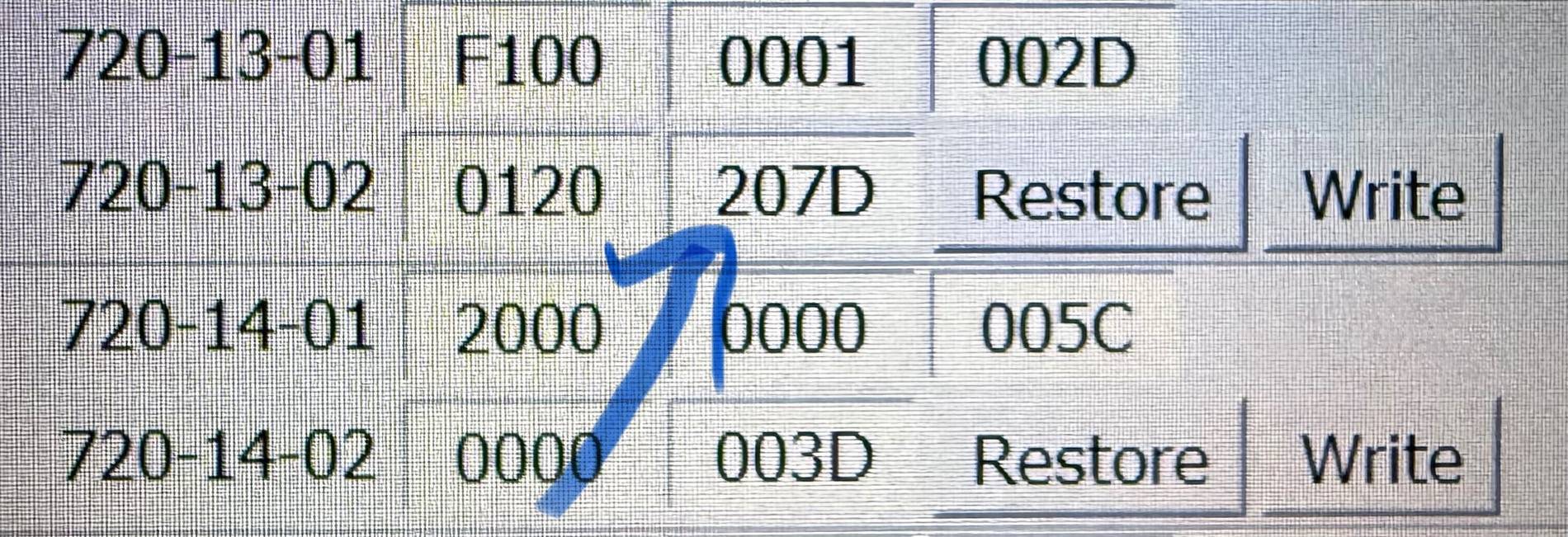
Did your truck come with digit 5 of 720-13-02 set to “0”, or did you change it from “2”?

Ford Ranger FORScan NA Ranger 6th Gen (2024+) Crowdsourced Spreadsheet IMG_3056
 

renato23

Well-Known Member
First Name
Renato
Joined
Feb 9, 2025
Threads
4
Messages
139
Reaction score
128
Location
Brazil
Vehicle(s)
Ranger Black 2.0
Occupation
Engineer
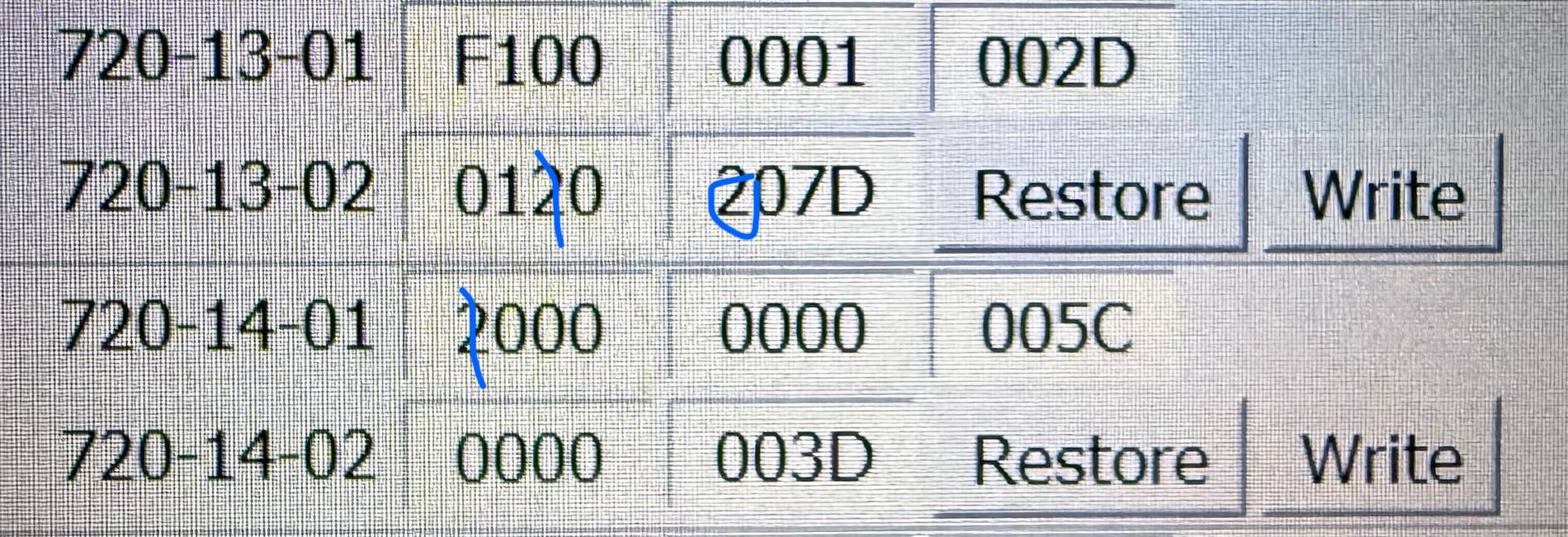
So you changed the three digits to 1,0,1 as i crudely drew in?
IMG_3048.jpeg
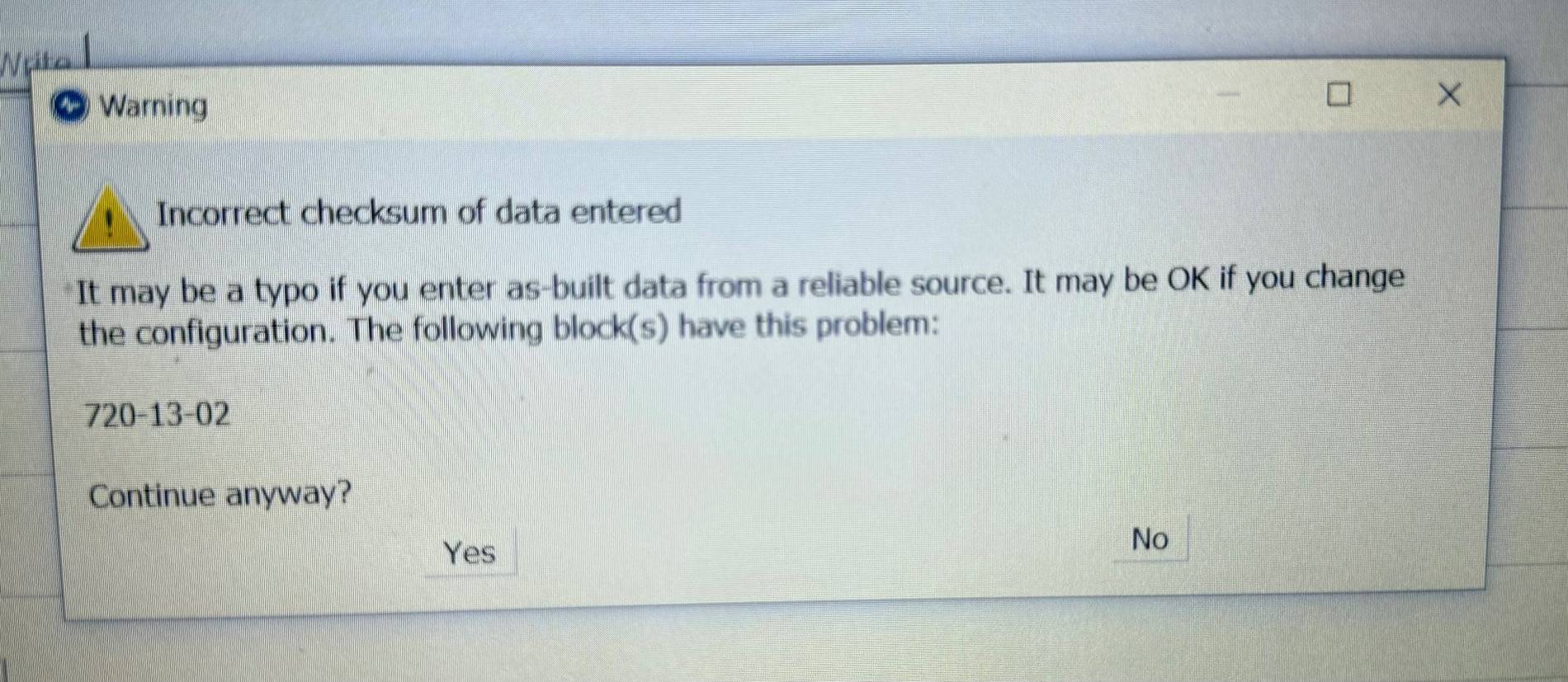
When i tried this I got this message:
Ford Ranger FORScan NA Ranger 6th Gen (2024+) Crowdsourced Spreadsheet IMG_1057


I'm going to try it by the non as built way.

What exactly I had to disable to make it work? Is changing "fixed seat present with belt minder" to "fixed seat present with belt monitor"?
 

a77cj7

Well-Known Member
First Name
Chris
Joined
Jul 25, 2023
Threads
4
Messages
146
Reaction score
258
Location
Sturgis, SD
Vehicle(s)
98 Ranger
When i tried this I got this message:
IMG_1057.jpeg


I'm going to try it by the non as built way.

What exactly I had to disable to make it work? Is changing "fixed seat present with belt minder" to "fixed seat present with belt monitor"?
That isn’t a problem, and you will always get that message when modifying as-built.
What it means is that the last two digits of the line (called the checksum) no longer are correct for the modified line.
Just click “yes” and forscan will automatically correct the checksum.

I don’t know if you can do it through non-as-built or not. I haven’t tried.
 

renato23

Well-Known Member
First Name
Renato
Joined
Feb 9, 2025
Threads
4
Messages
139
Reaction score
128
Location
Brazil
Vehicle(s)
Ranger Black 2.0
Occupation
Engineer
That isn’t a problem, and you will always get that message when modifying as-built.
What it means is that the last two digits of the line (called the checksum) no longer are correct for the modified line.
Just click “yes” and forscan will automatically correct the checksum.

I don’t know if you can do it through non-as-built or not. I haven’t tried.
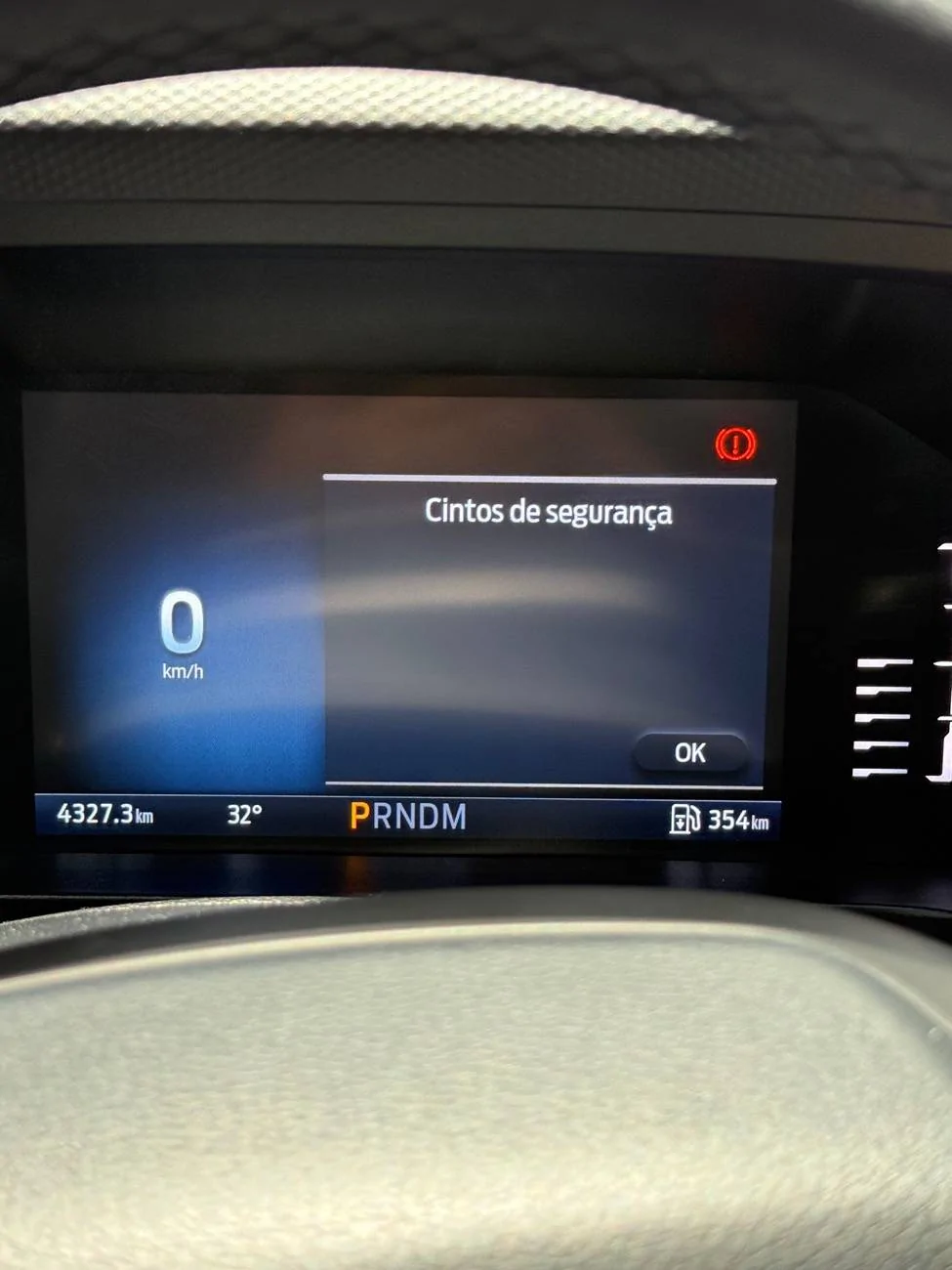
Did it. The top view seats are now gone and I still get a popup message with no content and forcing me to press ok ?

Ford Ranger FORScan NA Ranger 6th Gen (2024+) Crowdsourced Spreadsheet IMG_1059


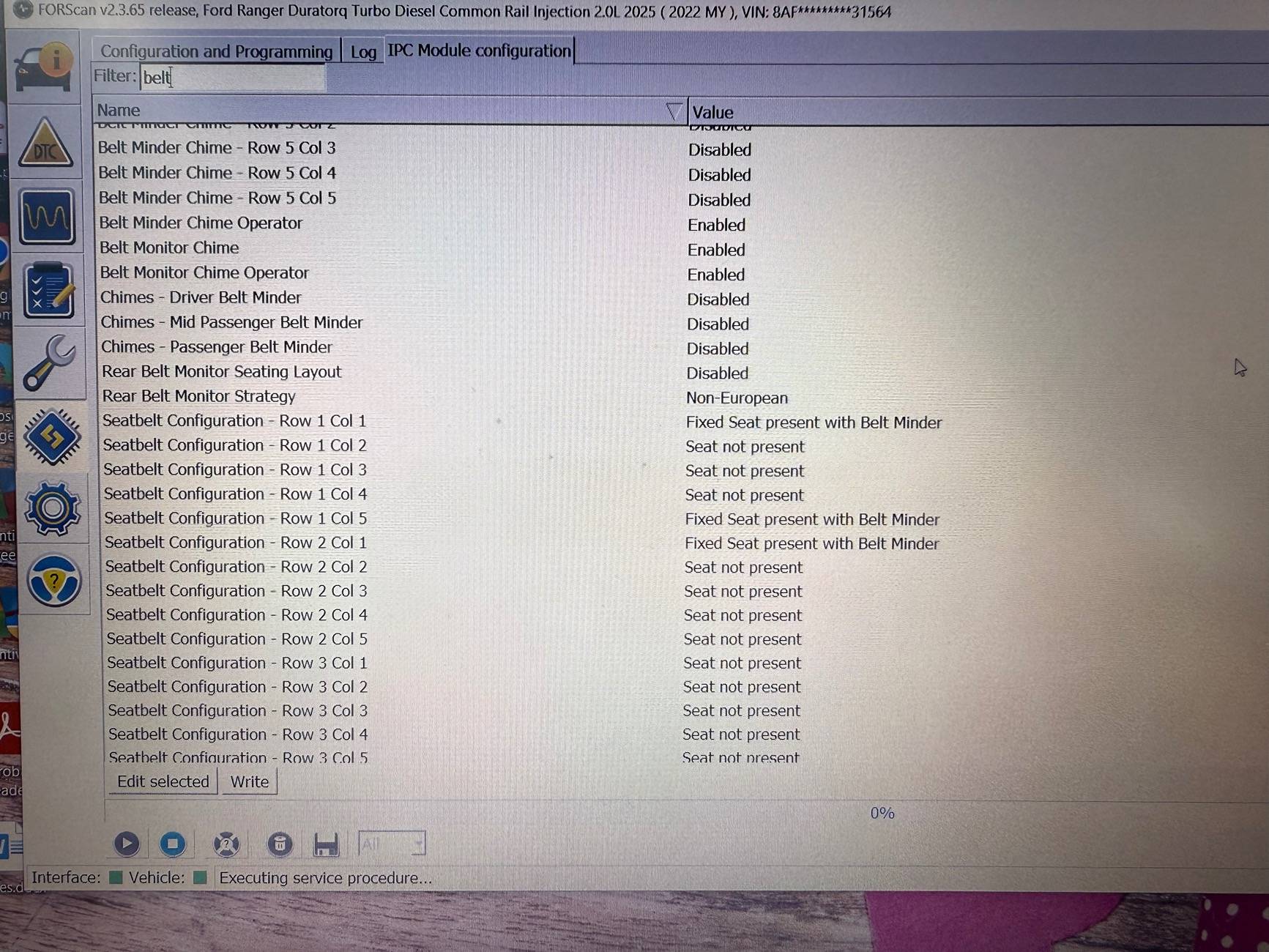
Clearly my version has something different from yours. Could you please take a picture of the values from your IPC NON AS BUILT Module so I can compare with mine?

I filtered the word "belt":
Ford Ranger FORScan NA Ranger 6th Gen (2024+) Crowdsourced Spreadsheet IMG_1060
 

Sponsored

a77cj7

Well-Known Member
First Name
Chris
Joined
Jul 25, 2023
Threads
4
Messages
146
Reaction score
258
Location
Sturgis, SD
Vehicle(s)
98 Ranger
Did it. The top view seats are now gone and I still get a popup message with no content and forcing me to press ok ?

IMG_1059.webp


Clearly my version has something different from yours. Could you please take a picture of the values from your IPC NON AS BUILT Module so I can compare with mine?

I filtered the word "belt":
IMG_1060.jpeg

I’m not near my truck or computer now. I’ll try to get a pic tonight.

It looks like the necessary options are in the non-asbuilt, interesting.

To match my config, try flipping seat r2c5 to “fixed seat with belt minder”
 

renato23

Well-Known Member
First Name
Renato
Joined
Feb 9, 2025
Threads
4
Messages
139
Reaction score
128
Location
Brazil
Vehicle(s)
Ranger Black 2.0
Occupation
Engineer
I’m not near my truck or computer now. I’ll try to get a pic tonight.

It looks like the necessary options are in the non-asbuilt, interesting.

To match my config, try flipping seat r2c5 to “fixed seat with belt minder”
I am 1 week experienced in forscan so I may be talking nonsense but I think the non as-built section have all the config you access via as built, just with a different presentation. The as-built version makes it faster to make the mods because with just one line of code you can change several values at once. AGAIN: I have 1 week experience in forscan, if i'm talking **** please disconsider. ?

With that being said and considering to be true, I prefer making changes by the non as-built because it's easier to know exactly what you are changing, making it easier to undo in case of some problem.

So, reading the values, I decided to change all seats (r1c1, r1c5, r2c1, r2c3 and r2c5) to "fixed seat present with belt monitor", as this is exactly what I want. I don't want the "belt minder" neither the "ok button". I'm gonna keep my search tonight.


PLUS: some people were talking about the driving modes selector a few days ago (@Tunisian ). Studying the IPC non as-built I found something interesting that might help you with: "Selectable Drive Mode" and my default value is Enabled. Maybe if you buy the button and conect it to your existing wires it might work.
 
Last edited:

Fawnbuster

Well-Known Member
First Name
Mike
Joined
Jul 14, 2019
Threads
12
Messages
481
Reaction score
253
Location
Indiana
Vehicle(s)
2025 Ranger Raptor
Occupation
Retired-Lieutenant, Sheriffs Office
When i tried this I got this message:
IMG_1057.jpeg


I'm going to try it by the non as built way.

What exactly I had to disable to make it work? Is changing "fixed seat present with belt minder" to "fixed seat present with belt monitor"?
You guys could be speaking Mandarin and Latin at the same time with your coding statements ?. Kudos to you all whoever figures out what code goes where and why, that's above my pay grade lol
 

a77cj7

Well-Known Member
First Name
Chris
Joined
Jul 25, 2023
Threads
4
Messages
146
Reaction score
258
Location
Sturgis, SD
Vehicle(s)
98 Ranger
I am 1 week experienced in forscan so I may be talking nonsense but I think the non as-built section have all the config you access via as built, just with a different presentation. The as-built version makes it faster to make the mods because with just one line of code you can change several values at once. AGAIN: I have 1 week experience in forscan, if i'm talking **** please disconsider. ?

With that being said and considering to be true, I prefer making changes by the non as-built because it's easier to know exactly what you are changing, making it easier to undo in case of some problem.

So, reading the values, I decided to change all seats (r1c1, r1c5, r2c1, r2c3 and r2c5) to "fixed seat present with belt monitor", as this is exactly what I want. I don't want the "belt minder" neither the "ok button". I'm gonna keep my search tonight.


PLUS: some people were talking about the driving modes selector a few days ago (@Tunisian ). Studying the IPC non as-built I found something interesting that might help you with: "Selectable Drive Mode" and my default value is Enabled. Maybe if you buy the button and conect it to your existing wires it might work.
Without diving too deep, the as built file is the current code in your truck. The non-as-built is plain English options made to change the code for you in an easier to understand format. Not all changes are available in non-as-built.
Non-as-built is generally safer, I often find the as built sheets easier to read and interpret.

You’ve got the belt minder/belt monitor thing backward. The belt monitor is the pop up window.

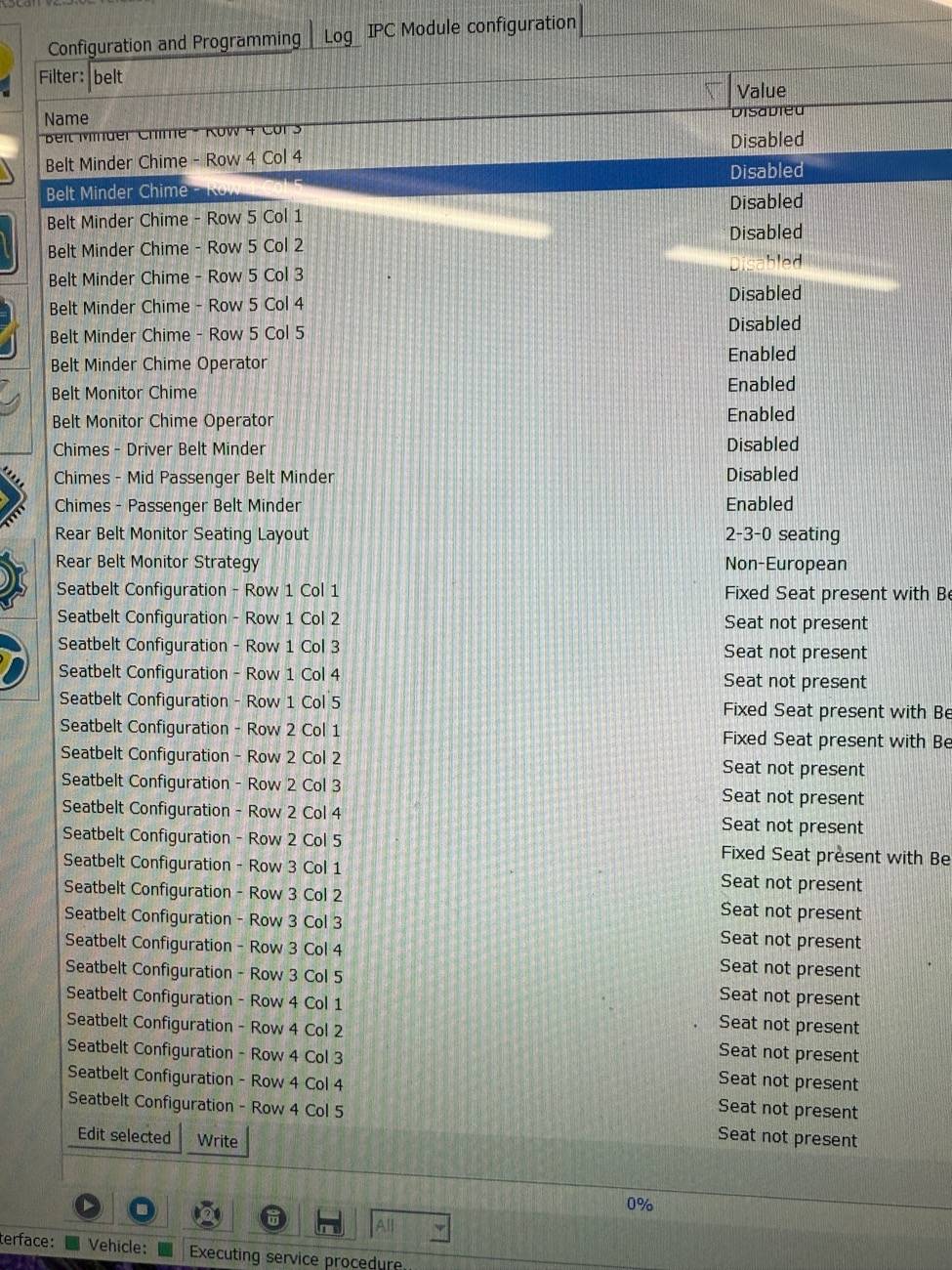
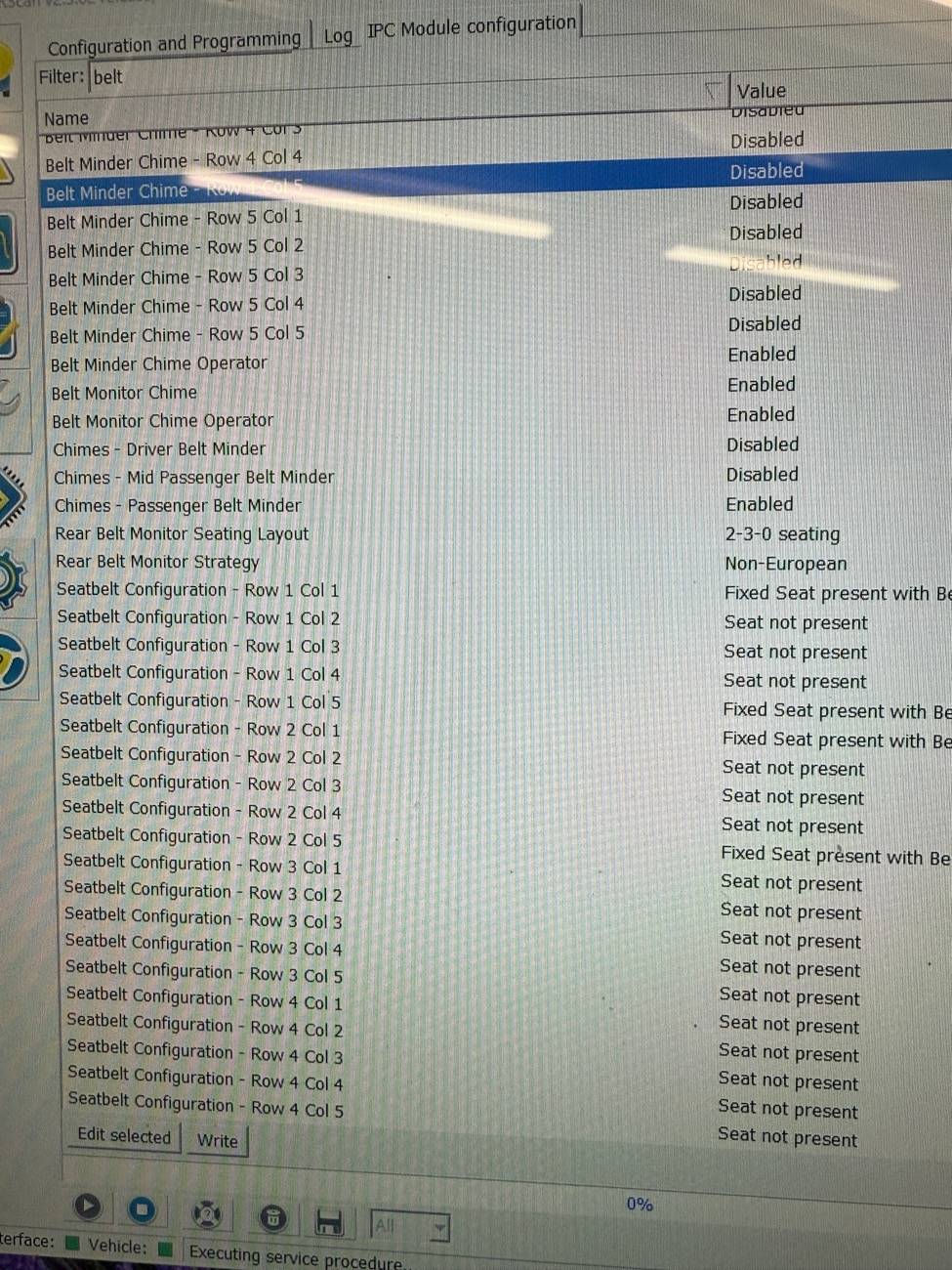
Here is a screenshot of my non-as-built belt options.
Ford Ranger FORScan NA Ranger 6th Gen (2024+) Crowdsourced Spreadsheet IMG_3064

Edit: I see i cropped off the full option. All four are set to “fixed seat with belt minder”.


I had to change seat r2c3 to “not present” on my truck. As explained in my original post, having all 5 seats enabled caused the pop up to return.

How my screen looks at startup:
Ford Ranger FORScan NA Ranger 6th Gen (2024+) Crowdsourced Spreadsheet IMG_3065


EDIT. Another crop failure. Yes, the little red seat logo is lit up for unbelted driver at the lower right. Just a photo fail by me.
 
Last edited:

renato23

Well-Known Member
First Name
Renato
Joined
Feb 9, 2025
Threads
4
Messages
139
Reaction score
128
Location
Brazil
Vehicle(s)
Ranger Black 2.0
Occupation
Engineer
Without diving too deep, the as built file is the current code in your truck. The non-as-built is plain English options made to change the code for you in an easier to understand format. Not all changes are available in non-as-built.
Non-as-built is generally safer, I often find the as built sheets easier to read and interpret.

You’ve got the belt minder/belt monitor thing backward. The belt monitor is the pop up window.

Here is a screenshot of my non-as-built belt options.
IMG_3064.jpeg

Edit: I see i cropped off the full option. All four are set to “fixed seat with belt minder”.


I had to change seat r2c3 to “not installed” on my truck. As explained in my original post, having all 5 seats enabled caused the pop up to return.

How my screen looks at startup:
IMG_3065.jpeg
Thanks for that! I'm gonna test it tomorrow.

In my case, when I turned off the "belt monitoring" the whole function was disabled. I got rid of the ok button message but I could not monitor all seat status in my cluster anymore. Anyway, the think that annoyed me the most was the belt chime, and that I was able to deactivate it. Now I guess I'm looking for something else to bother me so I can find a solution for it. ?

I'm gonna run some more tests tomorrow since I'm not willing to give up the monitoring system just to get rid of the ok button message. I'll keep you guys updated.

Once again, thanks for your support. I appreciate it.
 

Sponsored

a77cj7

Well-Known Member
First Name
Chris
Joined
Jul 25, 2023
Threads
4
Messages
146
Reaction score
258
Location
Sturgis, SD
Vehicle(s)
98 Ranger
Thanks for that! I'm gonna test it tomorrow.

In my case, when I turned off the "belt monitoring" the whole function was disabled. I got rid of the ok button message but I could not monitor all seat status in my cluster anymore. Anyway, the think that annoyed me the most was the belt chime, and that I was able to deactivate it. Now I guess I'm looking for something else to bother me so I can find a solution for it. ?

I'm gonna run some more tests tomorrow since I'm not willing to give up the monitoring system just to get rid of the ok button message. I'll keep you guys updated.

Once again, thanks for your support. I appreciate it.
I’m not entirely sure what you want.
Here’s how mine works currently with the code ive shared.

With either front passenger unbuckled, the dash seat icon lights up:
Ford Ranger FORScan NA Ranger 6th Gen (2024+) Crowdsourced Spreadsheet IMG_3068


However, i just found out a rear seat passenger will not trigger the unbuckled warning.

I switched the my view over to seatbelts, and it does not know there’s a rear seat passenger.
Ford Ranger FORScan NA Ranger 6th Gen (2024+) Crowdsourced Spreadsheet IMG_3066


However, when the rear passenger buckles up, it does show that:
Ford Ranger FORScan NA Ranger 6th Gen (2024+) Crowdsourced Spreadsheet IMG_3067


Yes, the front seats light up red on the seatbelt screen with no passenger. I didn’t return the code to stock to test, but I’m not sure my truck detects rear passengers at all.

I don’t have kids, so not a concern for me. Best of luck figuring out a solution that works for you.
 

Raptortugal

Well-Known Member
Joined
Jan 4, 2025
Threads
2
Messages
104
Reaction score
45
Location
Portugal
Vehicle(s)
Ranger Raptor 6g
Does the rear seat have presence sensors for the seats AND the seat belt buckles or only on the buckles ?

Let me explain:
- for a few weeks after buying my Raptor, when a rear passenger sat down WITHOUT buckling his seat belt the display turned gray
- when he buckled it the display turned green
- and if he unbuckled it turned red

Now if the rear passenger sits down without buckling his seat belt it is as if there was no one there, however it is displayed in green if he buckled it and red if he unbuckled it.
It is as if the car only "sees" the rear passenger through the buckle and no longer through the presence.
I should point out that I did not yet have Forscan at the time.

How is it at your place ?
 

renato23

Well-Known Member
First Name
Renato
Joined
Feb 9, 2025
Threads
4
Messages
139
Reaction score
128
Location
Brazil
Vehicle(s)
Ranger Black 2.0
Occupation
Engineer
I’m not entirely sure what you want.
Here’s how mine works currently with the code ive shared.

With either front passenger unbuckled, the dash seat icon lights up:
IMG_3068.jpeg


However, i just found out a rear seat passenger will not trigger the unbuckled warning.

I switched the my view over to seatbelts, and it does not know there’s a rear seat passenger.
IMG_3066.jpeg


However, when the rear passenger buckles up, it does show that:
IMG_3067.jpeg


Yes, the front seats light up red on the seatbelt screen with no passenger. I didn’t return the code to stock to test, but I’m not sure my truck detects rear passengers at all.

I don’t have kids, so not a concern for me. Best of luck figuring out a solution that works for you.
That is EXACTLY what I want! For the "ok button message" to disappear and still be able to monitor the seat belt status on My View.

In my car, when I put the code you shared it does quite the opposite to that: It keeps the ok button message with just a blank screen (no top display view of the car seats). When I manually navigate to My View, I can't find the seat belt monitor anymore. Even editing my view so I can select that option to be visible, it just shows nothing. It's seems like it turns off completely the monitoring thing.

Anyway, i'll keep pushing! Hope I can get a solution.
 

a77cj7

Well-Known Member
First Name
Chris
Joined
Jul 25, 2023
Threads
4
Messages
146
Reaction score
258
Location
Sturgis, SD
Vehicle(s)
98 Ranger
That is EXACTLY what I want! For the "ok button message" to disappear and still be able to monitor the seat belt status on My View.

In my car, when I put the code you shared it does quite the opposite to that: It keeps the ok button message with just a blank screen (no top display view of the car seats). When I manually navigate to My View, I can't find the seat belt monitor anymore. Even editing my view so I can select that option to be visible, it just shows nothing. It's seems like it turns off completely the monitoring thing.

Anyway, i'll keep pushing! Hope I can get a solution.
Ok, I don’t think you got line 720-14-01 written to match mine since its only showing three seats in the non as-built.

I do see another difference with the config though.
I think it explains your blank display, the truck doesn’t currently know what seat configuration to display.

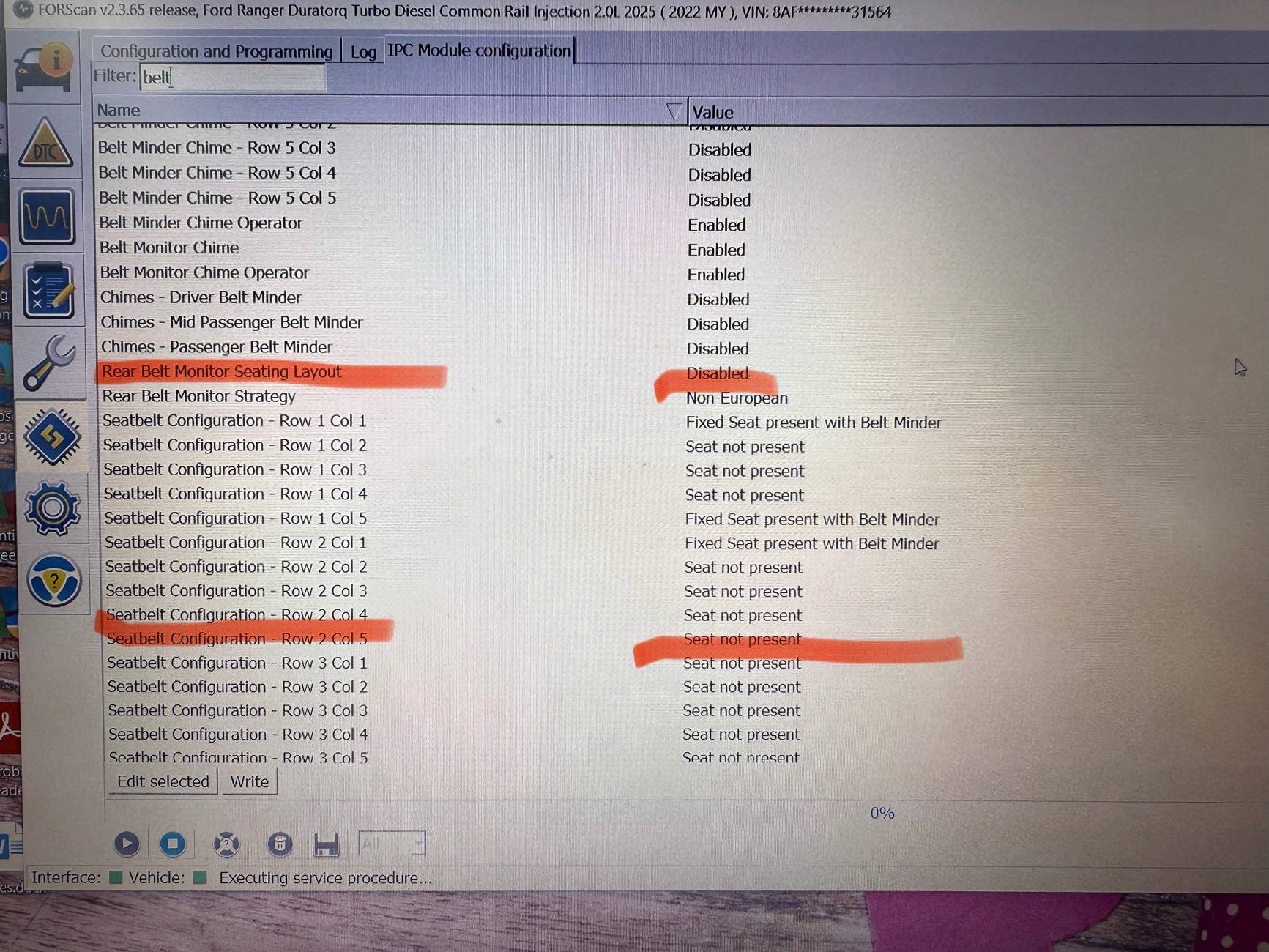
See highlights on your screenshot. Try changing them to match mine.

Ford Ranger FORScan NA Ranger 6th Gen (2024+) Crowdsourced Spreadsheet IMG_3078


Ford Ranger FORScan NA Ranger 6th Gen (2024+) Crowdsourced Spreadsheet IMG_3064
 

askr.eppo

Member
First Name
Andrew
Joined
Mar 3, 2025
Threads
2
Messages
6
Reaction score
1
Location
Poland
Vehicle(s)
Ranger Wildtrack 2.0 bi-turbo diesel
Guys, help. I was messing with forscan on '24 Ranger Wildtrack 2.0 bi turbo (euro model) and disabled ESP / TC button.
ESP works fine,disables itself when I go into 4 Low, butthe actual button is "dead". Anybody know what setting control this.
Sponsored


Top