Sponsored

Anyone with a 2024 STX having voice command issues?

Paolo Barechesto

New Member
First Name
Paul
Joined
Dec 20, 2024
Threads
1
Messages
4
Reaction score
0
Location
Riverside, CA
Vehicle(s)
2024 Ranger STX
My brand new 2024 STX that I purchased in December apparently has no voice command software. Any press of the voice button on the steering wheel only launches android auto. I have even tried just a quick tap and still just AA. So I cannot use my voice to change to my USB music, or anything really.
I brought it back to the stealership I bought it from twice. The first time, they told me that SYNC doesn't work that way anymore, and I use my phone to control the infotainment system. To which I replied that all Ford vehicles have SYNC voice command functions. The 2nd time, they told me that Ford hasn't developed the software for my trim level yet and it could be months before it is available.
I now have it at a 2nd dealership twice also now. The service advisor just says that his technician had no problem pairing his phone and it is good to go.
I told him that the phone isn't the problem; that standard SYNC commands are not available.
He said he would try to get a Ford engineer there in person, but so far over the phone Ford tells them it is operating as designed.
I have watched the videos on SYNC usage and setting the wake word, but I don't even have those features in my menu.
I would never have bought this vehicle without these functions, and just assumed it was working when I bought it. My fault on that part. I didn't have a USB drive to test it, and since I could pair my phone and launch android auto, I thought that meant it was working.
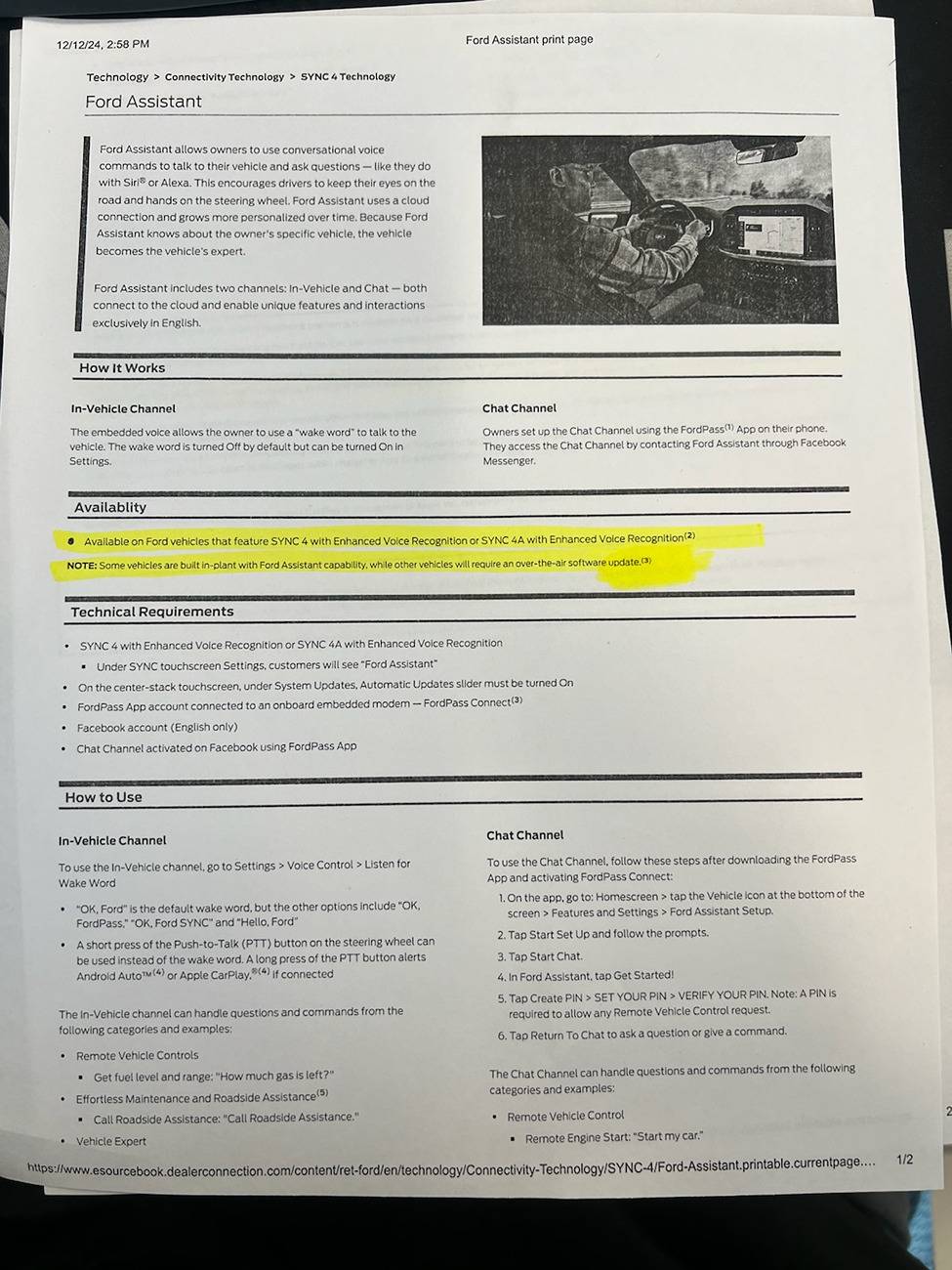
I also got this document via text from the sales manager at the original dealership. It says Ford sends some vehicles without SYNC installed, and requires an OTA update. However, Ford also says my truck has no available updates when I check either on the touchscreen menu, or by searching my VIN on the website.
Ford Ranger Anyone with a 2024 STX having voice command issues? Ford SYNC build
Sponsored


stuartmunto

Well-Known Member
First Name
Stuart
Joined
Aug 25, 2024
Threads
21
Messages
530
Reaction score
855
Location
Perth, Western Australia
Vehicle(s)
2023 Ford Ranger Raptor
Occupation
Engineer
Have you tried it without your phone connected. My understanding is the voice command button will trigger the phone voice if there is a phone connected

Try unpairing or moving your phone out of range and see if that works?
 
OP
OP

Paolo Barechesto

New Member
First Name
Paul
Joined
Dec 20, 2024
Threads
1
Messages
4
Reaction score
0
Location
Riverside, CA
Vehicle(s)
2024 Ranger STX
Yes. I have unpaired my phone and a quick press of the voice button just brings up the "pair a phone" screen.
 

MJE

Well-Known Member
First Name
Mike
Joined
Jan 24, 2023
Threads
6
Messages
326
Reaction score
336
Location
Calgary, AB
Vehicle(s)
2022 Ford Bronco Sport
Something potentially as simple as a sticky voice command steering wheel button? Not sure how sync 4 is, but in 3, one button press should just get you the sync voice commands. Press & hold is needed for Siri (say to send a text), otherwise as Stuart though, a press of the button gets you Siri when your phone is already hooked up via car play.
 

LeeHo

Well-Known Member
First Name
Lee
Joined
Jun 6, 2024
Threads
4
Messages
140
Reaction score
89
Location
Niles, Mi.
Vehicle(s)
Lincoln MKZ - Ranger Lariat w/2.7L Sport 4x4 Azure
Do you have Siri and does it work? Does it work w/o your cell on? Have you downloaded Ford PASS from Google Play and tried installing that from your cellphone?. These might trigger the rest Do either of these work for you? Which version of Sync do you have and do you have thr B&O sound system?
 

Sponsored
OP
OP

Paolo Barechesto

New Member
First Name
Paul
Joined
Dec 20, 2024
Threads
1
Messages
4
Reaction score
0
Location
Riverside, CA
Vehicle(s)
2024 Ranger STX
I have an Android phone (Samsung). With my phone paired, the voice button only launches google assistant. So if I say call my wife it just searches Google for anything called call my wife and says it can't find anything. If I say "USB" it tells me the it stands for Universal Serial Bus.
If I unpair or tun off my phone, pressing the button launches the "pair a phone" screen.
It is the basic standard sound system, not B&O.
This is my first vehicle with SYNC 4A. My wife's Explorer has SYNC 4 and my Taurus and Escape have SYNC 3. They all work fine with standard voice commands.(USB, play song-artist, change to FM95.5 etc.)
The dealers have told me that they have contacted the "Ford Hotline" and they installed a new SYNC module, re-installed software and there is nothing more they can do. The "technician" says "I can pair my phone(iPhone) and make a call so it's working fine."
They say my truck just doesn't have voice command capability, but the other Rangers on the lot with SYNC 4A on the window sticker work fine if I try to switch to USB or change the radio with voice commands.
I have downloaded the FordPass app and use it to remote start and look at the truck's location and stuff, but it hasn't helped with the SYNC issue.
So far it has been a cumulative total of 30 days out of service at 2 different dealers, and it's no closer to working correctly than day 1.
 

Awirez

Well-Known Member
First Name
Matt
Joined
Jan 2, 2025
Threads
12
Messages
235
Reaction score
211
Location
SC
Vehicle(s)
2025 Ranger Lariat FX4 2.7L, 2024 Highlander
If your able to make it work correctly on the dealer lot, with another truck where trim level is the same, I'd have some words. It's tangible evidence that something is awry.
 
OP
OP

Paolo Barechesto

New Member
First Name
Paul
Joined
Dec 20, 2024
Threads
1
Messages
4
Reaction score
0
Location
Riverside, CA
Vehicle(s)
2024 Ranger STX
Yeah, I'm going down there tomorrow after work with all the documents that I printed from the Ford website showing SYNC 4A is standard across all trim levels, list of SYNC commands and what they do, and my window sticker showing SYNC 4A as standard equipment.
They are going to tell me there is nothing else they can do and to take my truck home and go pound sand.
I have already called Ford Customer care and explained the situation with them shipping vehicles without the software that is listed as standard equipment and not informing the dealers nor providing the software for them to install or update.
The customer service rep was not very receptive and just asked what I expected her to do about it.
I told her that I either need the software installed for my truck to be completely functional as it should have been when I bought it or I need a check for the full purchase price.
She said she can't do either one and if I could think of any other way Ford could help me then I could call back.
I am considering finding a lemon law attorney at this point.
 

DutchRanger

Well-Known Member
First Name
Mark
Joined
Nov 16, 2024
Threads
14
Messages
223
Reaction score
324
Location
Austin
Vehicle(s)
24 ranger xlt fx4 2.7l
Try calling ford, they have a department that deals with sync/software stuff. They are much more knowledgeable than dealers
 

LeeHo

Well-Known Member
First Name
Lee
Joined
Jun 6, 2024
Threads
4
Messages
140
Reaction score
89
Location
Niles, Mi.
Vehicle(s)
Lincoln MKZ - Ranger Lariat w/2.7L Sport 4x4 Azure
I was having a similar problem with my 2024 Lariat and my Samung Galaxy S23 and my hearing aids. It was like pot luck whenever I tried to use the phone while in the truck and not even connected to sync. Also, same problem when tried thru any of the other phone connection (Hay Ford, Hello Alexa or Hay Google). I finally stumbled onto a solution that is working for me. The only catch is that you have to go thru the same damn sequence each time you disconnect from Sync 4a.

First, turn off your cell phone bluetooth and your hearing aid or earbud bluetooth BEFORE YOU ENTER YOUR TRUCK.
Second, start your truck and drive out of your garage and away form any household bluetooth or wifi interference. Sounds kind of stupid but that was just one of my problems - interference from household devices, including my garage door opener.
Third, start your Ford Ranger connect from your cell phone bluetooth. MAKE SURE YOUR HEARING AIDS OR EARBUDS ARE TURNED OFF. Wait for your cell phone to show CONNECTED FOR PHONE AND AUDIO. If it is not connecting, press the andriod icon on your dash.
Fourth, connect your your hearing aids or ear buds. They should connect without any problem.

To test, use the phone connect from your stearing wheel and see if it works. If it does, then try voice commands. It should work. Works for me.

This sequence is a pain in the ass but if it works for you too - great. If not - well that's a Ford for ya!

Seems like limiting outside interference and connection sequence is the key. Weird - but again - it's a Ford.
 

Sponsored

superj

Well-Known Member
First Name
Jason
Joined
Feb 8, 2025
Threads
40
Messages
3,485
Reaction score
3,202
Location
Corpus christi texas
Vehicle(s)
2004 ford ranger, 2024 ford ranger
Occupation
Aircraft examiner
so, i am trying to follow along, correct what i say wrong.

you get in and push the button and say call spouse and nothing happens. and if you just randomly say hey google, nothing happens?

i will have to try mine out. it surprised me one day because i said something and it spoke back to me. i don't remember what i said though.

i never tried call cristina (my wife) though. i will try it when i leave work. usually, i just hit the button on the screen for call and then hit her name.
 

LeeHo

Well-Known Member
First Name
Lee
Joined
Jun 6, 2024
Threads
4
Messages
140
Reaction score
89
Location
Niles, Mi.
Vehicle(s)
Lincoln MKZ - Ranger Lariat w/2.7L Sport 4x4 Azure
so, i am trying to follow along, correct what i say wrong.

you get in and push the button and say call spouse and nothing happens. and if you just randomly say hey google, nothing happens?

i will have to try mine out. it surprised me one day because i said something and it spoke back to me. i don't remember what i said though.

i never tried call cristina (my wife) though. i will try it when i leave work. usually, i just hit the button on the screen for call and then hit her name.
1. Regarding what to say, to wake up Ford and Alexa you need to program how you address them. Not 100% sure about Alexa - but definately Ford. There are options in the setup section. I have always just said "Hay Google" - not sure if you can program that or not. Google will automatically search my cell phone for contact info without downloading anything. Ford will not do that - not sure about Alexa.
2. The sequence that you connect your cell phone and hearing aids or earbuds with has a lot to do with getting the system to work. Outside intereference seems, at least in my case, a big factor.
3. Once it is set up, you should be able to connect thru voice commands via the steering wheel button, dash icons, or Ford, Alexa or Google voice commands.
 

superj

Well-Known Member
First Name
Jason
Joined
Feb 8, 2025
Threads
40
Messages
3,485
Reaction score
3,202
Location
Corpus christi texas
Vehicle(s)
2004 ford ranger, 2024 ford ranger
Occupation
Aircraft examiner
My hearing aids automatically become second connection when the truck hooks up. I geuss android auto does that?

Anyways, i will go check it out right now
 

superj

Well-Known Member
First Name
Jason
Joined
Feb 8, 2025
Threads
40
Messages
3,485
Reaction score
3,202
Location
Corpus christi texas
Vehicle(s)
2004 ford ranger, 2024 ford ranger
Occupation
Aircraft examiner
So far, hey google, call Cristina or call and a name works.

The little face talking button on the steering wheel doesn't appear to do anything.

The phone button on the steering wheel brings uo my contacts on the center screen above the knobs.
 

LeeHo

Well-Known Member
First Name
Lee
Joined
Jun 6, 2024
Threads
4
Messages
140
Reaction score
89
Location
Niles, Mi.
Vehicle(s)
Lincoln MKZ - Ranger Lariat w/2.7L Sport 4x4 Azure
Have you downloaded and setup the Fordpass app from Google Play yet?
Sponsored


Top