
Sponsored

stuartmunto
Well-Known Member
- First Name
- Stuart
- Joined
- Aug 25, 2024
- Threads
- 21
- Messages
- 572
- Reaction score
- 951
- Location
- Perth, Western Australia
- Vehicle(s)
- 2023 Ford Ranger Raptor
- Occupation
- Engineer
When was the last time you drove it before today?
Looks like that's the auto start/stop function re-enabling again. The system will disable the start/stop function if your battery voltage is too low, after driving for some time the battery will be fully charged and the system can now start to use the auto start/stop function again
Looks like that's the auto start/stop function re-enabling again. The system will disable the start/stop function if your battery voltage is too low, after driving for some time the battery will be fully charged and the system can now start to use the auto start/stop function again
FergyA
Well-Known Member
- Joined
- Jul 2, 2025
- Threads
- 11
- Messages
- 159
- Reaction score
- 137
- Location
- LA County, CA
- Vehicle(s)
- '24 Ranger XLT FX4
- Occupation
- Mech. Engineer
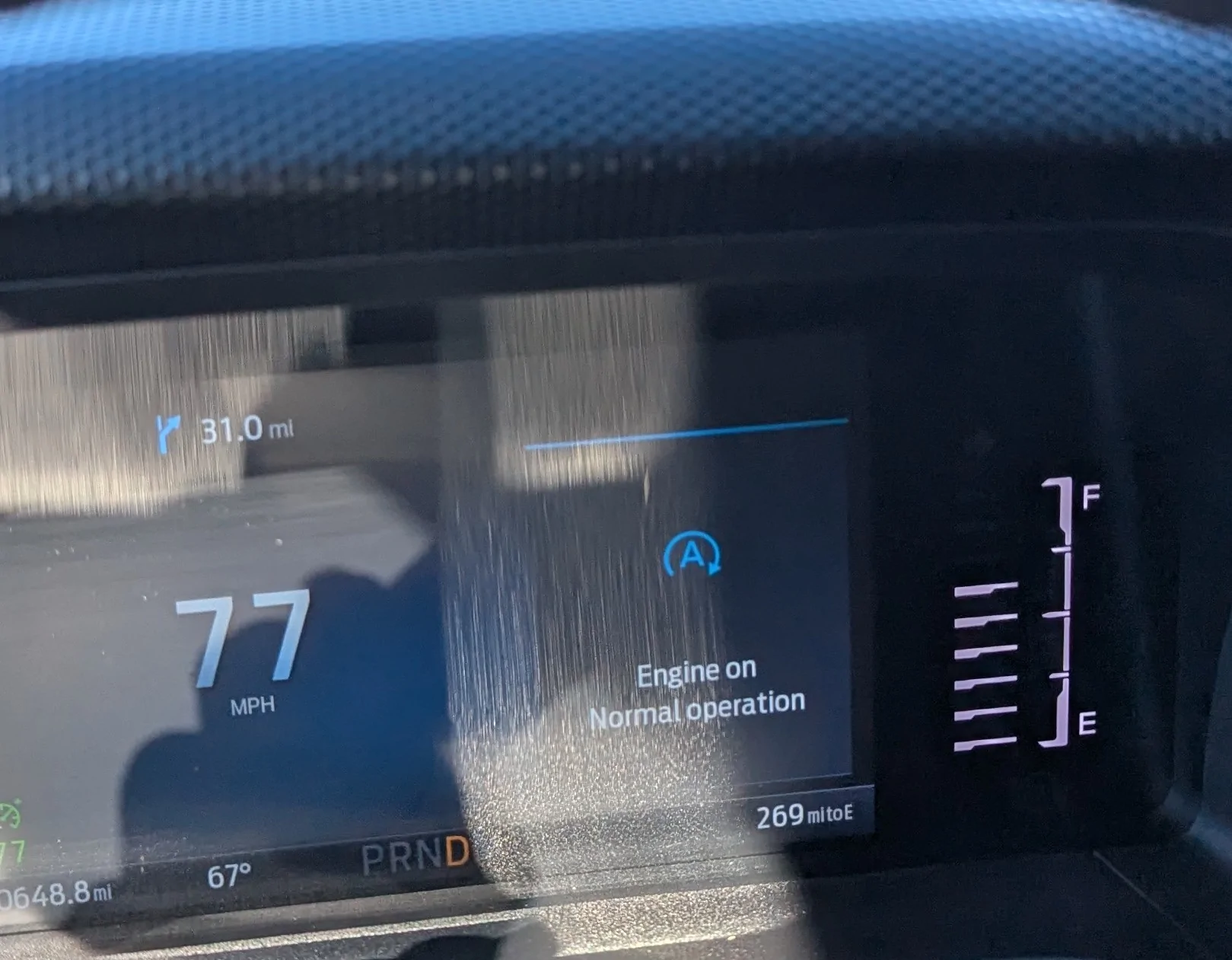
That definitely is the auto start/stop status display which shows under the trip/fuel category on the quick menus. It's one down from the mpg meter, so you could have easily switched to it with an accidental bump of the down arrow on the right side of the steering wheel.
It shows this engine on normal operation screen whenever the engine is running, or when auto start/stop triggers it'll switch to a screen that tells you it's active. If it doesn't engage or turns the engine back on while you're stationary (say to keep the ac going, or because the battery is too low, or the outside temp is too high) it will tell you why. It's good for diagnosing issues with the auto start/stop functionality.
It shows this engine on normal operation screen whenever the engine is running, or when auto start/stop triggers it'll switch to a screen that tells you it's active. If it doesn't engage or turns the engine back on while you're stationary (say to keep the ac going, or because the battery is too low, or the outside temp is too high) it will tell you why. It's good for diagnosing issues with the auto start/stop functionality.
Sponsored
Trimjb
Well-Known Member
- Thread starter
- #6
On a cross country trip. This was second day about 250 miles into the day. Truck is driven almost every day.When was the last time you drove it before today?
Looks like that's the auto start/stop function re-enabling again. The system will disable the start/stop function if your battery voltage is too low, after driving for some time the battery will be fully charged and the system can now start to use the auto start/stop function again
Trimjb
Well-Known Member
- Thread starter
- #7
Tha
In 10k and a few long distance trips I had never seen this display before.
I cleared it with the cancel button on the wheel. Hasn't returned. Making another 2400 mile run in a couple of weeks.
Thanks, it's possible I bumped the switch. I usually have auto start disabled.That definitely is the auto start/stop status display which shows under the trip/fuel category on the quick menus. It's one down from the mpg meter, so you could have easily switched to it with an accidental bump of the down arrow on the right side of the steering wheel.
It shows this engine on normal operation screen whenever the engine is running, or when auto start/stop triggers it'll switch to a screen that tells you it's active. If it doesn't engage or turns the engine back on while you're stationary (say to keep the ac going, or because the battery is too low, or the outside temp is too high) it will tell you why. It's good for diagnosing issues with the auto start/stop functionality.
In 10k and a few long distance trips I had never seen this display before.
I cleared it with the cancel button on the wheel. Hasn't returned. Making another 2400 mile run in a couple of weeks.
Trimjb
Well-Known Member
- Thread starter
- #8
I always get the auto start message while deactivating.
This message came on at highway speeds without touching anything on the controls.
It was a good indicator all is well with auto start and engine normal.
In 10k, I had not seen it before. Came on once during a 4 day 2400 mile run
This message came on at highway speeds without touching anything on the controls.
It was a good indicator all is well with auto start and engine normal.
In 10k, I had not seen it before. Came on once during a 4 day 2400 mile run
natethegreat42
Well-Known Member
All these responses are wrong. This is one of the quick menus when you scroll through with the up/down button on the right side of the steering wheel. Seen this many times before. Should be able to click the back button to dismiss. Can also click up or down and you will see the trip menus and fuel economy menus.
The auto start stop defeat switch on or off notifications disappear after a few seconds.
The auto start stop defeat switch on or off notifications disappear after a few seconds.
Trimjb
Well-Known Member
- Thread starter
- #10
I didn't scroll thru anything.All these responses are wrong. This is one of the quick menus when you scroll through with the up/down button on the right side of the steering wheel. Seen this many times before. Should be able to click the back button to dismiss. Can also click up or down and you will see the trip menus and fuel economy menus.
The auto start stop defeat switch on or off notifications disappear after a few seconds.
I was driving down the highway when it came on.
It didn't disappear like it would normally when you push the auto start button
I manually cancelled it with the menu cancel button.
Not a big deal, just had not had this message pop up before out of the blue.
Sponsored
natethegreat42
Well-Known Member
It didn’t disappear because it’s not the notification that the auto start/stop was turned on or off. It’s the status message in the set of menus. Next time you are in your truck, you could probably find this again. Just press your OK button and scroll up or down until you see it, I don’t remember which order it is in the list.I didn't scroll thru anything.
I was driving down the highway when it came on.
It didn't disappear like it would normally when you push the auto start button
I manually cancelled it with the menu cancel button.
Not a big deal, just had not had this message pop up before out of the blue.
Wasn’t trying to say you did anyone wrong. I have this happen too sometimes when I thought I didn’t have the menu open and I must have accidentally clicked my OK button.
It randomly appearing is rather strange though.
Trimjb
Well-Known Member
- Thread starter
- #12
Ok thanks. I'll check it out.It didn’t disappear because it’s not the notification that the auto start/stop was turned on or off. It’s the status message in the set of menus. Next time you are in your truck, you could probably find this again. Just press your OK button and scroll up or down until you see it, I don’t remember which order it is in the list.
Wasn’t trying to say you did anyone wrong. I have this happen too sometimes when I thought I didn’t have the menu open and I must have accidentally clicked my OK button.
It randomly appearing is rather strange though.
I do tend to monitor tire pressure while I driving long trips. Maybe I hit a button.
Only came on once in 2400 miles.
natethegreat42
Well-Known Member
Oh! This reminds me of a question I have never gotten a chance to ask: have you ever been able to get the tire pressure gauge to stay available while driving? Mine turns off once my speed is greater than 5 MPH.Ok thanks. I'll check it out.
I do tend to monitor tire pressure while I driving long trips. Maybe I hit a button.
Only came on once in 2400 miles.
Trimjb
Well-Known Member
- Thread starter
- #14
I have not tried. I just do a quick check.Oh! This reminds me of a question I have never gotten a chance to ask: have you ever been able to get the tire pressure gauge to stay available while driving? Mine turns off once my speed is greater than 5 MPH.
I'll have to try and see what happens.
I would think it would stay on just like fuel economy is selected in my view.
Jason B
Well-Known Member
When selected, my tire pressure display will always show, no matter what speed I'm driving. It's one of the things I have selected in My View settings, along with trip computer and fuel milage.Oh! This reminds me of a question I have never gotten a chance to ask: have you ever been able to get the tire pressure gauge to stay available while driving? Mine turns off once my speed is greater than 5 MPH.
Sponsored


