Sponsored

FORScan Caused Check Engine for Tire Circumference Change

Alaska Steve

Well-Known Member
First Name
Steve
Joined
Sep 17, 2024
Threads
8
Messages
247
Reaction score
314
Location
Alaska
Vehicle(s)
2024 Ranger Lariat FX4
I downloaded the most recent version of Forscan today, got an extended license, and attempted to change the BCM value for my tire circumference from 2408 to 2558mm. It seemed to Write ok (engine off) and it is the only change I made.

After power cycling the truck, the Check Engine light illuminated, I got 3 DTC codes on PCM, BCM, and AWD.(?). I started the truck to see if the codes would clear; they did not. I think I saw someone else state that the max value the BCM would accept is 2480, so I tried that. Same results. I reentered the original value of 2408; same results. Forscan read back my entered values after power cycles...

I tried to clear the DTC codes using Forscan, but the Reset Codes button would not illuminate and did not clear the codes.
Then I tried to use the Forscan Disconnect button and it would not disconnect; so I just closed the program and disconnect the reader card.

So then I test drove the truck around the block to see if the codes would clear; they did not. Fortunately the truck didn't go into limp mode and 4H/4L/Lockers all work, but Trail Assist cannot be used.

Now I'll have to go to the dealer on Monday to clear the errors. Thanks Ford for making a simple calibration issue so difficult to deal with!

Has anyone else run into this and is going to the dealer the only remedy?
Sponsored
 

stuartmunto

Well-Known Member
First Name
Stuart
Joined
Aug 25, 2024
Threads
21
Messages
530
Reaction score
855
Location
Perth, Western Australia
Vehicle(s)
2023 Ford Ranger Raptor
Occupation
Engineer
Have you tried to do a Module Reset after adjusting the wheel circumference? I think the ABS and IPC modules need to be reset and then driven for a few miles for it to start the calibration for the new wheel size

You can do this by:
- Connect to Forscan
- Click on the chip icon
- scroll down until you see 'Module Reset [Module Name]'
- Press the play button to run the reset program for that module (Ignition power cycle is required for each module)

I would recommend doing both the ABS and IPC modules, but you can also do PCM/TCM module as well. The ABS Module is what is most likely throwing the check engine light and why your trail assist isn't working

Also - Forscan is not a Ford Approved method of editing/modifying these trucks - you can always take the truck in to the dealer to have them update the wheel size. So it's not really on Ford to make it simple to use Forscan, which is why Forscan is a use at your own risk type deal
 
OP
OP
Alaska Steve

Alaska Steve

Well-Known Member
First Name
Steve
Joined
Sep 17, 2024
Threads
8
Messages
247
Reaction score
314
Location
Alaska
Vehicle(s)
2024 Ranger Lariat FX4
@stuartmunto I don’t see a Module Reset under the chip icon, I do see a Module Reboot under the wrench icon (I have not run that ). I also figured what my previous disconnect was; I did’t ā€˜stop’ the BCM configuration module.
 
Last edited:

RCMUSTANG

Well-Known Member
First Name
Ray
Joined
Jan 22, 2019
Threads
2
Messages
1,463
Reaction score
465
Location
Los Angeles
Vehicle(s)
1989 Mustang 2017 Fusion
Ford Ranger FORScan Caused Check Engine for Tire Circumference Change Screenshot_20250816_214026_Messenger
 
  • Like
Reactions: PAW

stuartmunto

Well-Known Member
First Name
Stuart
Joined
Aug 25, 2024
Threads
21
Messages
530
Reaction score
855
Location
Perth, Western Australia
Vehicle(s)
2023 Ford Ranger Raptor
Occupation
Engineer
@stuartmunto I don’t see a Module Reset under the chip icon, I do see a Module Reboot under the wrench icon (I have not run that ). I also figured what my previous disconnect was; I did’t ā€˜stop’ the BCM configuration module.
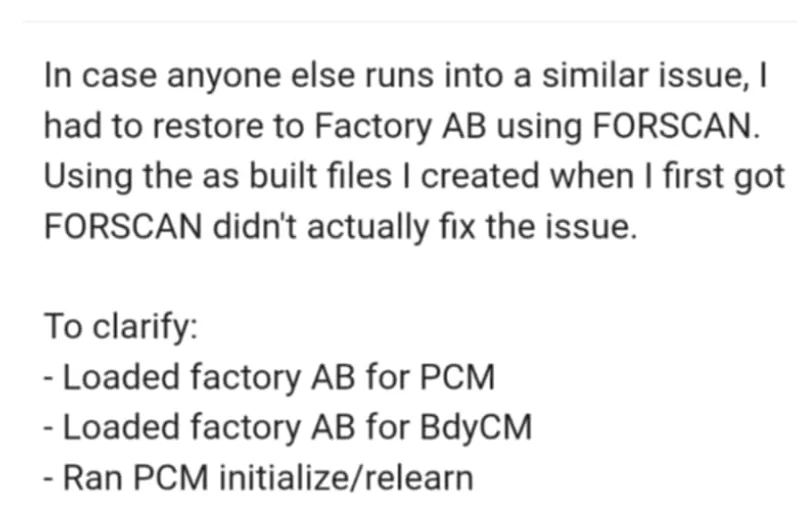
Sorry yeah, I did mean the wrench icon... my mistake. Give the reset module a go I guess? Might need to take it for a drive afterwards though... otherwise, you may need to load factory AB or head into a dealer.
 

Sponsored
OP
OP
Alaska Steve

Alaska Steve

Well-Known Member
First Name
Steve
Joined
Sep 17, 2024
Threads
8
Messages
247
Reaction score
314
Location
Alaska
Vehicle(s)
2024 Ranger Lariat FX4
I found this video on YouTube for an F150 and it was close enough to help me understand and resolve the issues.

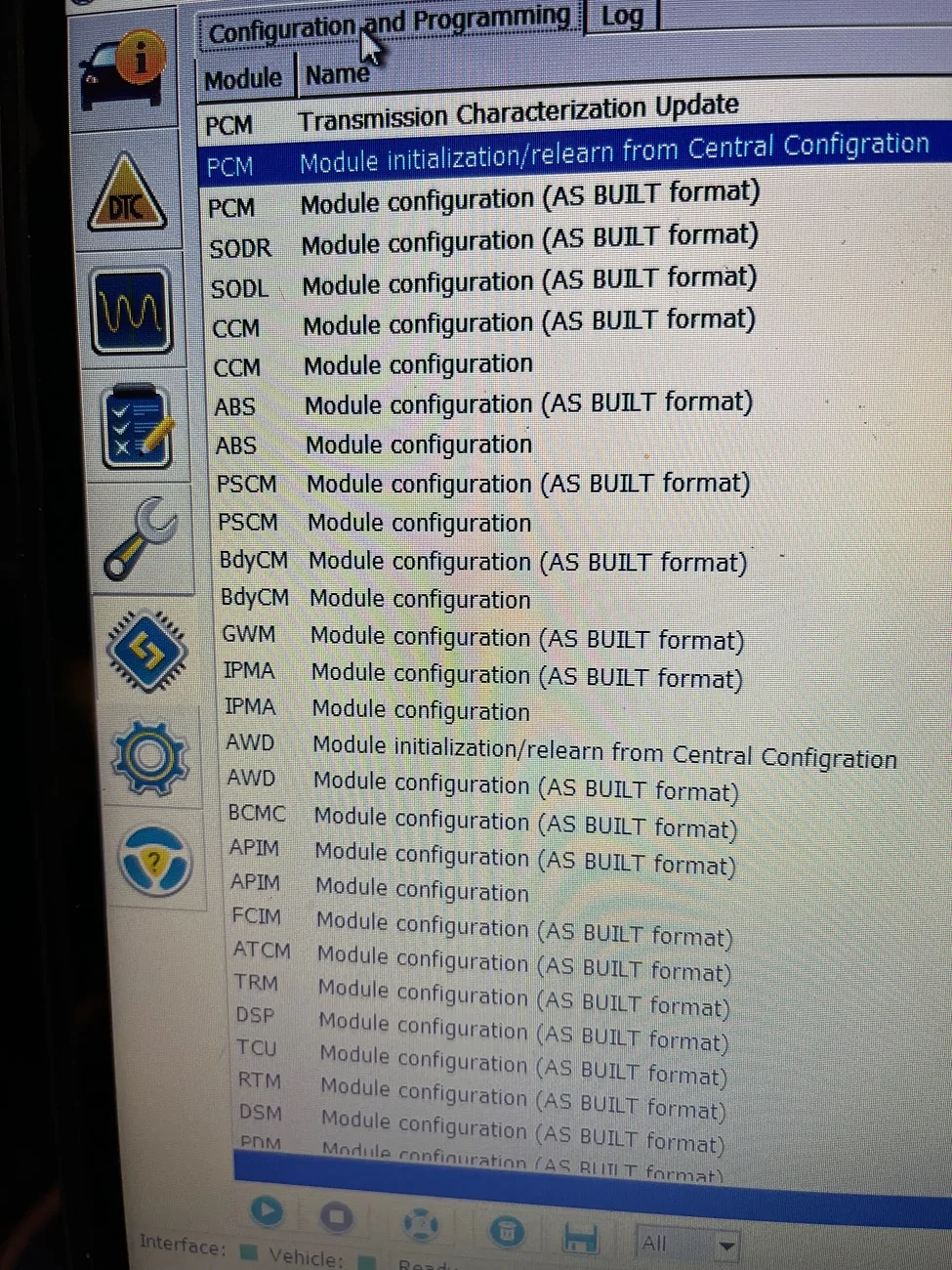
The correct steps are:
1) Access the BCM Configuration tool, locate the Tire Circumference and update the diameter as needed.
2) Write the settings, then cycle the truckā€˜s power. Note the wrench icon will illuminate
3) Exit the module
4) Access the PCM Module initialization/relearn from Central Configuration module and run it. Takes about 40 seconds after you hit the ok prompts
5) Cycle the truck’s power when prompted.
6) Access the AWD Module initialization/relearn from Central Configuration module and run it. Takes about 20 seconds after you hit the ok prompts
7) The wrench icon should disappear. If it doesn’t, select the DTC icon in Forscan and reset the DTC codes.

As points of interest, my truck was factory set to 2408; Tire calculator said I should set to 2558 for my tires; that resulted in my GPS being 2-3mph slower than the speedo; whereas, my GPS speed was 1-2mph faster than the speedo before the change at 70mph. After multiple test runs up to 70mph, I ended up at 2472. That’s right on the threshold of being right on, I could probably drop it another 4mm and get it a little better. Speedo said 70 and GPS bounced a little between 69 and 70.

Ford Ranger FORScan Caused Check Engine for Tire Circumference Change IMG_1381
 
Last edited:

stemplar

Well-Known Member
Joined
Sep 7, 2023
Threads
19
Messages
680
Reaction score
959
Location
Pennsylvania
Vehicle(s)
2025 Ranger Lariat 2.7
I found this video on YouTube for an F150 and it was close enough to help me understand and resolve the issues.

The correct steps are:
1) Access the BCM Configuration tool, locate the Tire Circumference and update the diameter as needed.
2) Write the settings, then cycle the truckā€˜s power. Note the wrench icon will illuminate
3) Exit the module
4) Access the PCM Module initialization/relearn from Central Configuration module and run it. Takes about 40 seconds after you hit the ok prompts
5) Cycle the truck’s power when prompted.
6) Access the AWD Module initialization/relearn from Central Configuration module and run it. Takes about 20 seconds after you hit the ok prompts
7) The wrench icon should disappear. If it doesn’t, select the DTC icon in Forscan and reset the DTC codes.

As points of interest, my truck was factory set to 2408; Tire calculator said I should set to 2558 for my tires; that resulted in my GPS being 2-3mph slower than the speedo; whereas, my GPS speed was 1-2mph faster than the speedo before the change at 70mph. After multiple test runs up to 70mph, I ended up at 2472. That’s right on the threshold of being right on, I could probably drop it another 4mm and get it a little better. Speedo said 70 and GPS bounced a little between 69 and 70.

IMG_1381.jpeg
Thank you for typing this up! It's so much easier for me to follow written instructions rather than watch a video and hit play/pause/play/pause/play/pause... etc, so again, thank you.

You went through some trial and error for your speedometer, but for future reference there's a known "squish factor" with tire size calibration: multiply the circumference (in mm) by 0.967 and use that number. For your circumference that would yield 2473.586 which is pretty much where you landed after your trial and error.
Sponsored


Top