Sponsored

Riot

New Member
First Name
Marc
Joined
Aug 23, 2025
Threads
0
Messages
4
Reaction score
0
Location
Switzerland
Vehicle(s)
Ford Ranger Raptor 2023
Confirmed working @ 2023 Wildtrak EU Version:

Turn signal as orange position lights.
bdyCM:
Turn Signal: change to: Turn + Position
Left Turn Signal: change to: Turn + Postion + DLR
Right Turn Singal: change to: Turn + Position + DLR
Where exactly do I find that? I cant find it on the spreadsheet
Sponsored


Riot

New Member
First Name
Marc
Joined
Aug 23, 2025
Threads
0
Messages
4
Reaction score
0
Location
Switzerland
Vehicle(s)
Ford Ranger Raptor 2023
Thank you for doing this. I didn’t like the uncertainty about airbags with all seats “removed”, but hadn’t taken the time to dig further.
I can confirm this works on an American raptor with one minor change.

TLDR version:
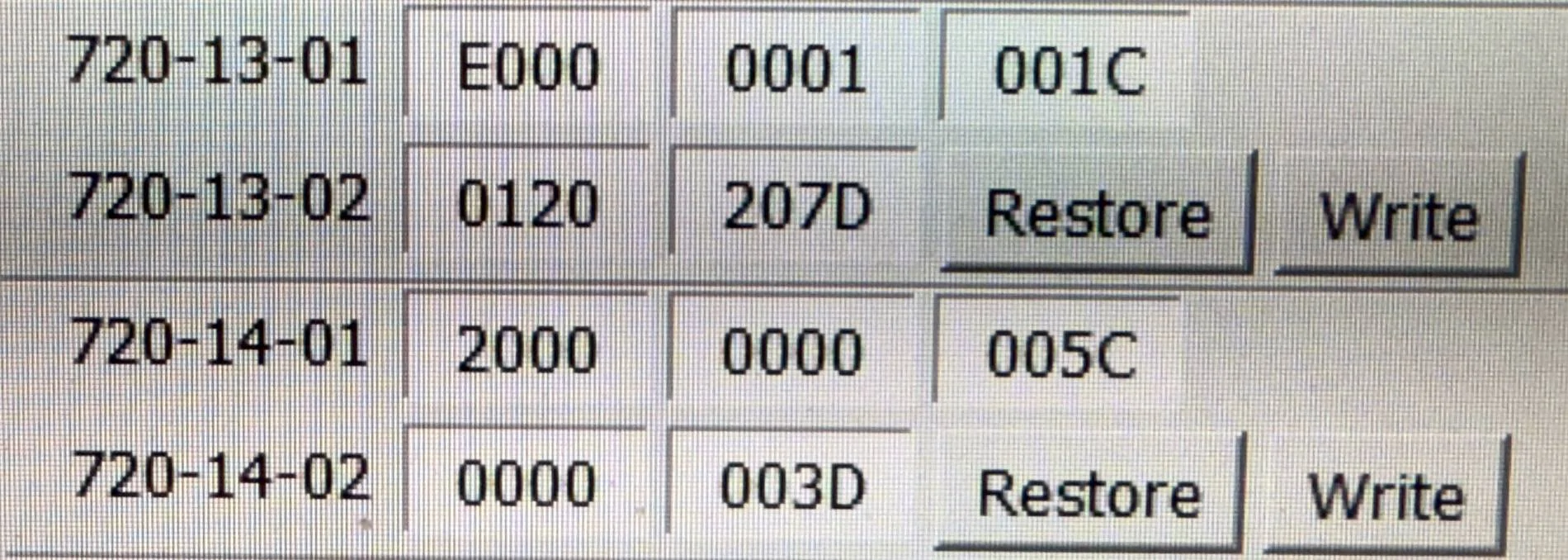
Before:
IMG_3025.jpeg

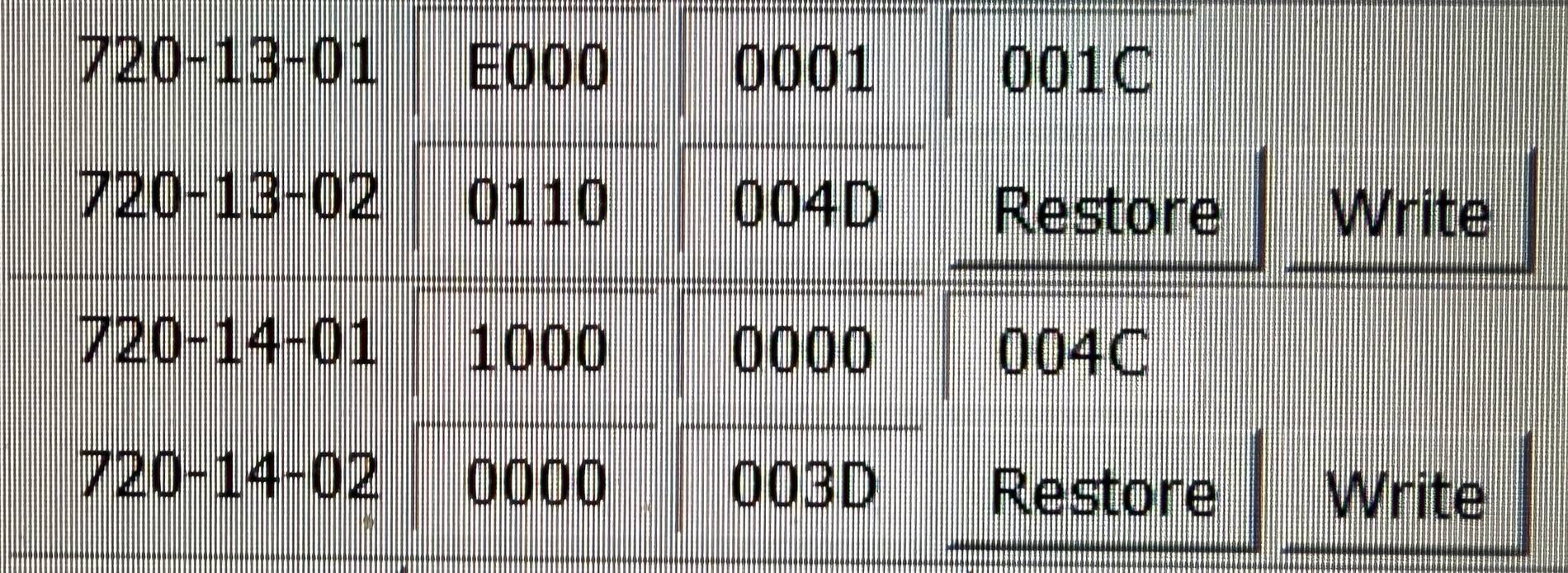
After:
IMG_3024.jpeg


The difference is the 5th digit of 720-13-02, change it from “2” to “0”. Long explanation below.

The first two digits of 720-13-01 are “E0” because I have the front seat chimes disabled. If you want the chimes on, leave at the factory “F1”.

Ok, now for a more detailed look at these settings. Again, this is for an American market Raptor
The final two digits of each line are the checksum, ignore them.

The programming if these 4 lines is set up to control 5 rows of seats, with 5 seats per row. Seems excessive, but apparently ford found it to be necessary.

The first 7 digits of line 720-13-01 control the chimes for each seat position.
Factory of “F100 000” sets chimes on for seat R1C1 and R1C5, the driver and front passenger seats.
Changing it to “E000 000” sets all chimes to off, but leaves the operators functional.

Digits 8-10 of line 720-13-01, and all digits of lines 720-13-02, 720-14-01, and 720-14-02 set the type of each seat and monitoring.
There are quite a few options if you consult the spreadsheet, but only three pertain to this configuration.

“0” sets the seat as “not present”
“1” sets the seat as “fixed seat with belt minder”
“2” sets the seat as “fixed seat with belt monitor”

Googling these terms relative to forscan shows that a belt minder is the chime, and a belt monitor is the popup window.

The factory coding shows seats R1C1 and R1C5 as “1” for belt minder. These are the front seats

Seats R2C1, R2C3, and R2C5 are set as “2” for belt monitor. These are the rear seats.

Ideally, setting R2C1, R2C3, and R2C5 to “1” for belt minder should make the popup window disappear, but it doesn’t. My testing shows that any 4 of the seats can be set to “1”, but the 5th has to be “0” for not present. I have no idea why, but I tested many combos with the same result.

Due to this, I set the rear center seat to “0” for not present. This is the 5th digit of line 720-13-02. The other four seats are set to “1”.

The message box is gone, and I’m no longer concerned about air bag functionality.
I got an EU Raptor and i want to disable the reminders of the Back Seats since thats my Dogs "place" and i dont want to keep the seatbelts buckled in all the time. Do you know if its the same coding for me? and does it disable all the warnings from the back row seats?
 

just a guy with a truck

Active Member
First Name
Eric
Joined
Sep 12, 2025
Threads
2
Messages
32
Reaction score
52
Location
usa
Vehicle(s)
2025 xlt fx4 ranger
for setting the EQ to a Flat signal :
ACM (ASBUILT) 727-01-02
Change the last digit in the first bank of four digits to a "0".

verified on my '25 xlt.

would do this if upgrading the stereo using a DSP and want an un corrected signal into the amp. it affects all speakers.
 

GLIZZO

Member
Joined
Oct 13, 2025
Threads
2
Messages
14
Reaction score
5
Location
Florida, USA
Vehicle(s)
2025 Ford Ranger Raptor
OK, then we can try decoding your string to see if it makes sense and go from there... Unfortunately the spreadsheet only has information for the first 6 digits but comparing yours to mine this is what I get:

CNmAtTyG04
Before TTA760-03-01 F27C 764F760-03-01 9B42 C14C FF54
Set 1 Digits
760-03-01 **xx xxxx
F29B
Set 1 DecodedACC Adaptive Cruise Control Stop & Go • CMB With CMbB Always • HDC Trail Control [MFAL FECAD] • TBA Without TBA MFAL DAXAA (LESS ASSIST PACKAGES) • PA With FAPA [MFAL HNSAC(FAPA)]ACC Adaptive Cruise Control • CMB Without CMbB N/A • HDC Trail Control w/ Trail 1 Pedal [MFAL FECAE] • TBA Without TBA MFAL DAXAA (LESS ASSIST PACKAGES) • PA Not Used
Set 2 Digits
760-03-01 xx*x xxxx
74
Set 2 DecodedRBA RBA • S With eShifter • AFS With AFS [MFAL GPAAW]RBA RBA • S Without eShifter • AFS Without AFS [MFAL GPAAW]
Set 3 Digits
760-03-01 xxx* xxxx
C2
Set 3 DecodedPIB With PIB [MFAL HKLAB,HKLAE,HKLAF] • AH With AutoHitch [MFAL C2FAB(AutoHitch)] • PATS Enable • ADD ADD collection EnabledPIB Without PIB [MFAL HKLAA] • AH Without AutoHitch • PATS Disable • ADD ADD collection Enabled
Set 4 Digits
760-03-01 xxxx **xx
76C1
Set 4 DecodedTTA Without TTA • AVH With AVH • TBC With TrailerBrakeController • TCS Trail Control Switch input from the APIM • SDMG SDM Gen4 • HDCST HDC Soft Switch Input from the APIMTTA With TTA • AVH With AVH • TBC Without TrailerBrakeController • TCS Trail Control Switch input from the IPC • SDMG SDM Gen3 • HDCST HDC Hard Switch Input from the ATCM
Set 5 Digits
760-03-01 xxxx xx**
4F4C
No info for the last two digits
760-03-01 xxxx xx**
??????


I'm not sure how that translates into what you actually have on your car but mine (CN column) describes my features correctly.

Also note that you have the value "C1" in the 5th and 6th digit which according to the worksheet means that you already have TTA enabled?

To enable TTA on my vehicle, I changed the 76 in xxxx **xx to F6 to enable TTA.


None of this solves your problem though I'm afraid.
I’m having this same issue. Perhaps something has changed on the 2025 Ranger raptor? Has anyone been able to resolve this and get trail turn working? Did I fuck up by enabling the APIM Settings first? I went and disabled them but the code for the ABS is still 9B42 C14C FF54 for field 760-03-01. Will other features no longer work now, or was this always the correct code for the 2025 model? Would love if someone with a 25RR could confirm their ABS code for 760-03-01. I would really love to have trail turn.
 
Last edited:

Sequoia

Well-Known Member
First Name
Dan
Joined
Nov 30, 2024
Threads
0
Messages
123
Reaction score
32
Location
Germany
Vehicle(s)
Ranger Wildtrak 2023
I got an EU Raptor and i want to disable the reminders of the Back Seats since thats my Dogs "place" and i dont want to keep the seatbelts buckled in all the time. Do you know if its the same coding for me? and does it disable all the warnings from the back row seats?
Das geht anders. Es gibt da so Dinge wie "10 Mal Sitzgurt ein uns ausstecken".

Hier die Anleitung:
Gurtwarner Ton deaktivieren
Du kannst jeden einzelnen Gurt „deaktivieren“, indem du:
Zündung aus-Zündung an, dann 10mal den entsprechenden Gurt in das dazugehörige Schloss stecken und wieder entriegeln, dann Zündung aus und wieder an.
Dann ist der Warnton an diesem Platz deaktiviert.

To be fair, in English:
That works differently. There are things like “plug and unplug the seatbelt ten times.”

Here’s the instruction:
Disable seatbelt warning chime
You can disable each individual seatbelt by doing the following:
Turn ignition off – then on, plug and unplug the corresponding seatbelt ten times, then turn the ignition off and on again.
The warning chime for that seat will then be deactivated.
 

Sponsored

Hande

Well-Known Member
First Name
Hannu
Joined
Oct 15, 2025
Threads
5
Messages
93
Reaction score
47
Location
Estonia
Vehicle(s)
2025 Ford Ranger Raptor Diesel
Occupation
Business Owner
Das geht anders. Es gibt da so Dinge wie "10 Mal Sitzgurt ein uns ausstecken".

Hier die Anleitung:
Gurtwarner Ton deaktivieren
Du kannst jeden einzelnen Gurt „deaktivieren“, indem du:
Zündung aus-Zündung an, dann 10mal den entsprechenden Gurt in das dazugehörige Schloss stecken und wieder entriegeln, dann Zündung aus und wieder an.
Dann ist der Warnton an diesem Platz deaktiviert.

To be fair, in English:
That works differently. There are things like “plug and unplug the seatbelt ten times.”

Here’s the instruction:
Disable seatbelt warning chime
You can disable each individual seatbelt by doing the following:
Turn ignition off – then on, plug and unplug the corresponding seatbelt ten times, then turn the ignition off and on again.
The warning chime for that seat will then be deactivated.
Unfortunately, this does not work :(
I tried 5 times, no change in seat belt chime and/or warning.
 

vivasjm

Member
First Name
Juan Manuel
Joined
Feb 24, 2024
Threads
4
Messages
13
Reaction score
0
Location
México
Vehicle(s)
Ranger Raptor 2023
Occupation
Employee
Sorry guys, a dummy question. In the spreadsheet when you see a "-" what do you need to do? leave the original value? don't set anything?

Eg.: to enable TTA

in address 7D0-10-02 my stock value is "0000 0075 005E",
the value changes in the spreadsheet says "xxxx xxx* xx--",
the comment is "* -> Bit 3 (add 4 to enable)"

so I need to change it from "0000 0075 005E" to "0000 0079 00" or "0000 0079 005E" ?

Ford Ranger FORScan NA Ranger 6th Gen (2024+) Crowdsourced Spreadsheet 1760636806285-rw
 
Last edited:

Hande

Well-Known Member
First Name
Hannu
Joined
Oct 15, 2025
Threads
5
Messages
93
Reaction score
47
Location
Estonia
Vehicle(s)
2025 Ford Ranger Raptor Diesel
Occupation
Business Owner
Is there a way to adjust Ranger Raptor 2024 auto high beam not speed dependent? On small twisty (off)roads would be nice to have it working below 25 mph.
 

SnyperX

Well-Known Member
First Name
Mark
Joined
Mar 24, 2025
Threads
3
Messages
51
Reaction score
43
Location
Wisconsin
Vehicle(s)
2024 Ford Ranger XLT
Hello!! So have been making a few changes to my config. Silent mode for camping and DRLs with signal etc. Want to get rid of the "Full View Not Available" box for the camera. It states to use AS-BUILT. I don't understand the text at the end on the spreadsheet entry (e.g. change 2 to 3). Do I just need to change the 2 to a 1 in the first group of 4 hex numbers or change the 2 to a 3 as it seems to indicate?
 

CrustyNoodle

Well-Known Member
First Name
Peter
Joined
Oct 18, 2022
Threads
7
Messages
179
Reaction score
168
Location
Melbourne, Australia
Vehicle(s)
2010 BMW 135i, '19 Rangie Sport, '23 Ranger Raptor
Occupation
Mechanical Engineer
Is there a way to adjust Ranger Raptor 2024 auto high beam not speed dependent? On small twisty (off)roads would be nice to have it working below 25 mph.
In my diggings into ForScan I seem to remember seeing something that might enable you to change the enable speed. However I can't remember where it was and I have not tried it.

I'm sorry I can't help any more than that but I would say that it is worth your while poking around a bit in the ForScan spreadsheet to see if you can find it.
 

Sponsored

Riot

New Member
First Name
Marc
Joined
Aug 23, 2025
Threads
0
Messages
4
Reaction score
0
Location
Switzerland
Vehicle(s)
Ford Ranger Raptor 2023
Das geht anders. Es gibt da so Dinge wie "10 Mal Sitzgurt ein uns ausstecken".

Hier die Anleitung:
Gurtwarner Ton deaktivieren
Du kannst jeden einzelnen Gurt „deaktivieren“, indem du:
Zündung aus-Zündung an, dann 10mal den entsprechenden Gurt in das dazugehörige Schloss stecken und wieder entriegeln, dann Zündung aus und wieder an.
Dann ist der Warnton an diesem Platz deaktiviert.

To be fair, in English:
That works differently. There are things like “plug and unplug the seatbelt ten times.”

Here’s the instruction:
Disable seatbelt warning chime
You can disable each individual seatbelt by doing the following:
Turn ignition off – then on, plug and unplug the corresponding seatbelt ten times, then turn the ignition off and on again.
The warning chime for that seat will then be deactivated.
Achwas! Das wusst ich nicht, danke vielmals! Werde ich gleich ausprobieren!

Grüsse
 

Arsenall11

Well-Known Member
First Name
Dave
Joined
Feb 11, 2024
Threads
22
Messages
730
Reaction score
765
Location
Maple Valley Wa
Vehicle(s)
24 Ranger Raptor
Occupation
Mechanical contractor
For some reason I can’t get my hardware I’d to be accepted for the key, any ideas?
 

Hande

Well-Known Member
First Name
Hannu
Joined
Oct 15, 2025
Threads
5
Messages
93
Reaction score
47
Location
Estonia
Vehicle(s)
2025 Ford Ranger Raptor Diesel
Occupation
Business Owner
In my diggings into ForScan I seem to remember seeing something that might enable you to change the enable speed. However I can't remember where it was and I have not tried it.

I'm sorry I can't help any more than that but I would say that it is worth your while poking around a bit in the ForScan spreadsheet to see if you can find it.
Thank you for your reply. I have been reading the spreadsheet 3 times and still can not find it. Not even by searching "speed", "headlight" etc.

Do you have any idea, in which module it could have been?
 

radial

Active Member
First Name
Rich
Joined
Aug 8, 2024
Threads
0
Messages
30
Reaction score
24
Location
Maryland
Vehicle(s)
2024 Ranger Raptor
Thank you for your reply. I have been reading the spreadsheet 3 times and still can not find it. Not even by searching "speed", "headlight" etc.

Do you have any idea, in which module it could have been?
I don't think you can change this behavior in FORscan.


Top