Sponsored

DutchRanger

Well-Known Member
First Name
Mark
Joined
Nov 16, 2024
Threads
14
Messages
223
Reaction score
324
Location
Austin
Vehicle(s)
24 ranger xlt fx4 2.7l
Added Mud/Rut, Sand and Rock Crawl Mode, Changed my auto blinker to 6 blinks, Set my headlight switch to remember the last setting, and set my Fogs to on with high Beams. So cool.
What module did you go to, to add in Mud/Rut, Sand and Rock Crawl?
Sponsored


renato23

Well-Known Member
First Name
Renato
Joined
Feb 9, 2025
Threads
4
Messages
139
Reaction score
128
Location
Brazil
Vehicle(s)
Ranger Black 2.0
Occupation
Engineer

Karanger

New Member
First Name
EMil
Joined
Jul 9, 2025
Threads
1
Messages
2
Reaction score
0
Location
Poland
Vehicle(s)
Ford Ranger PHEV
New Ford Ranger 2025 FHEV / PHEV Hybrid Plugin.
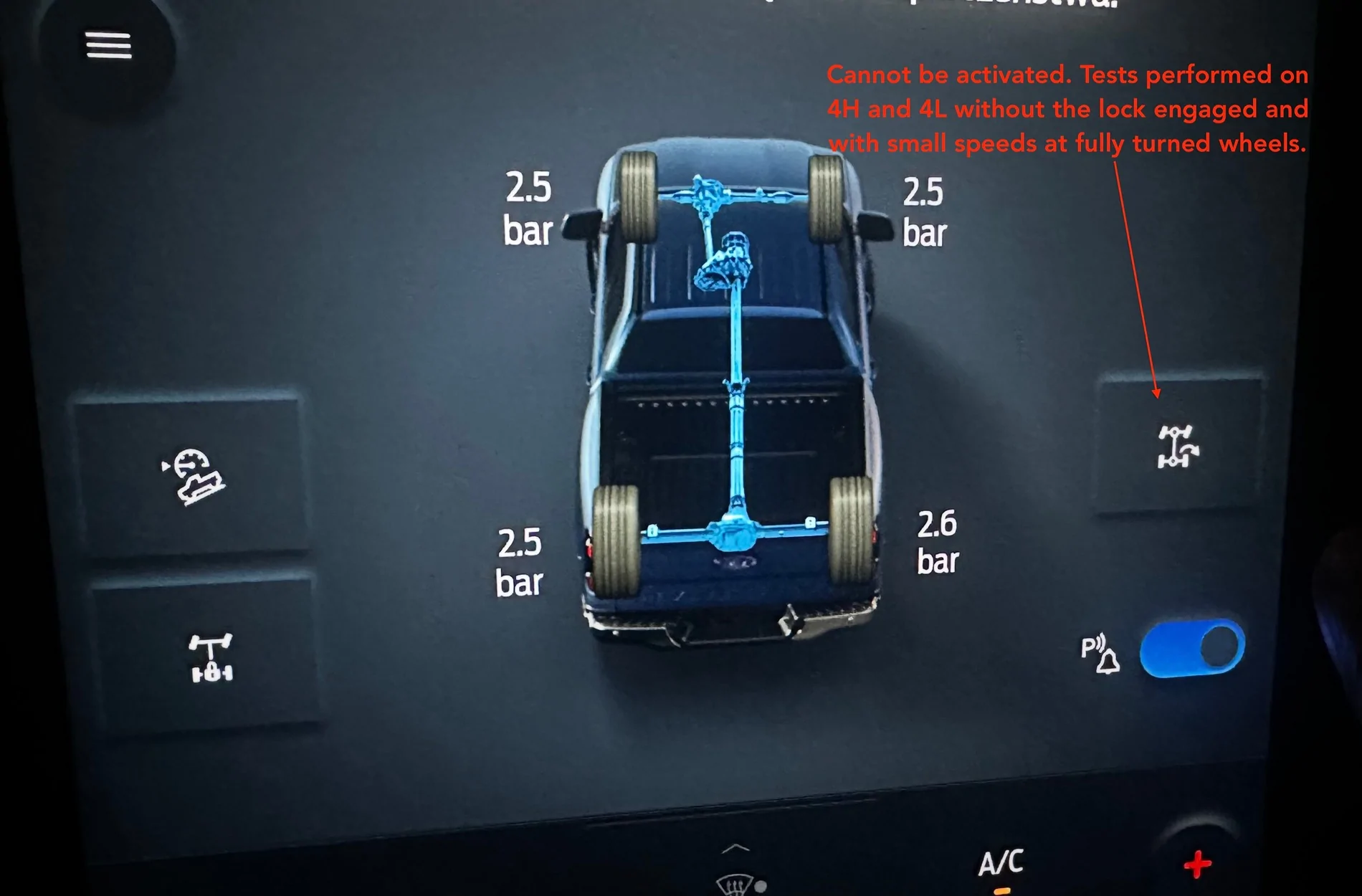
Trail Turn Assist shows in menu but won’t engage — ABS 760-03-01 P703M 2025 FHEV (marketed PHEV)]

• 2025 Ranger P703M, 2.3L I4 GTDI FHEV (sold as “PHEV”), 4WD full-time, A10R80-MHT-X
• FORScan test build 2.3.67.test20250828 (works and lets me write ABS)

What I did
• In APIM I enabled: Off-Road Menu – Trail Turn Assist and Trail Turn Assist.
• The TTA icon appears, but pressing it does nothing. No side arrows on the truck graphic.

Ask
Which first two hex of the middle block (760-03-01) should a 2025 P703M FHEV use so TTA actually arms?
I suspect my current “81” expects an IPC/Gen3 hard switch, but I’m triggering from APIM (soft) and maybe need APIM/ATCM and/or SDM Gen4.

ABS As-Built now
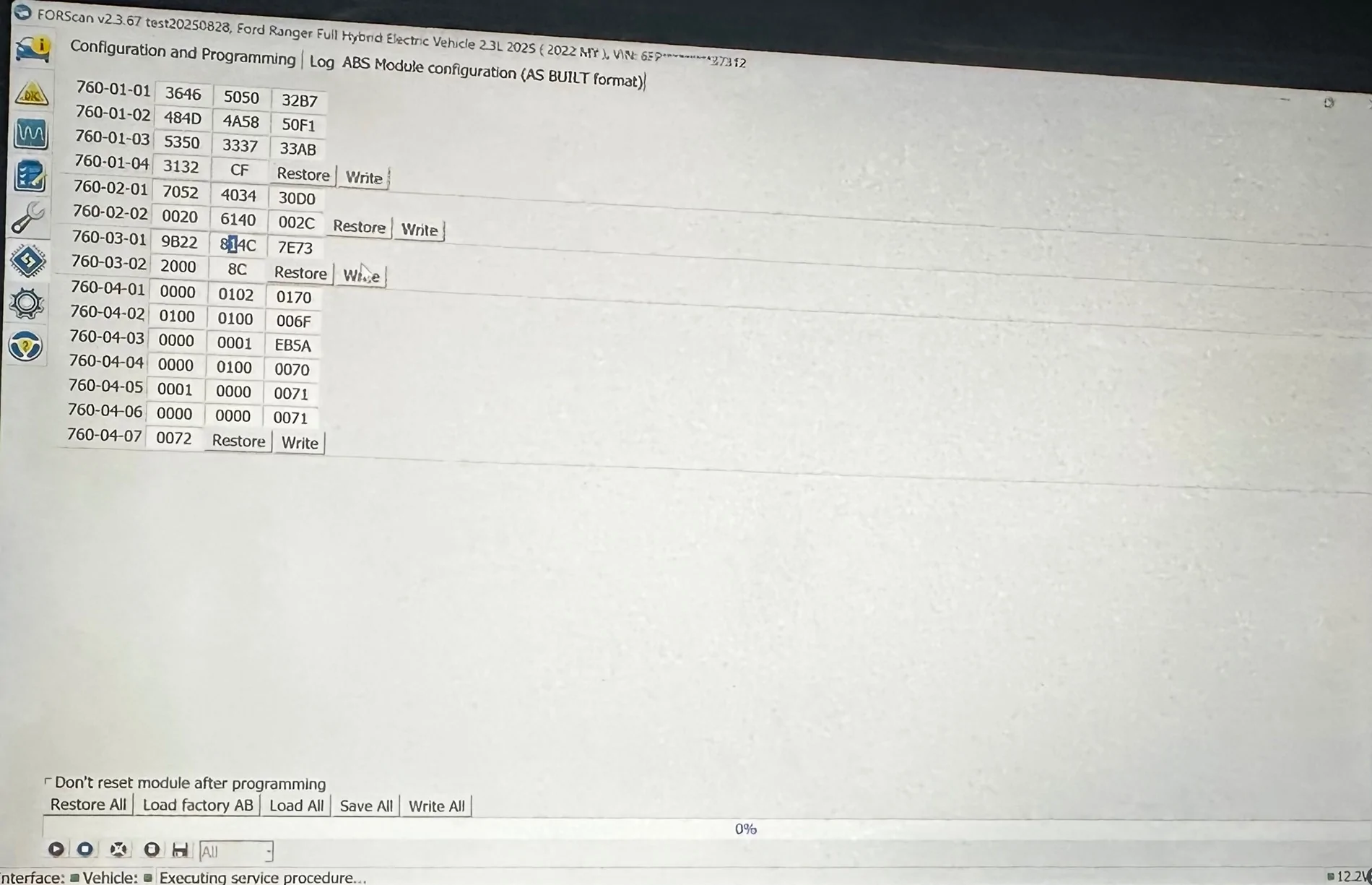
• 760-03-01: 9B22 814C 7E73

I try (change only those two hex; let checksum update):
Dxxx → 9B22 Dxxx 7E73
Fxxx → 9B22 Fxxx 7E73
• APIM + SDM Gen4 (soft): 86xx → 9B22 86xx 7E73
• ATCM + SDM Gen4 (hard): 8Dxx → 9B22 8Dxx 7E73
• APIM + SDM Gen3 (soft): 82xx → 9B22 82xx 7E73

Test conditions checked: low speed, 4H/4L, wheel turned, indicator set, no trailer/TBC conflicts, no DTCs.
Procedure each attempt: write → clear DTCs → SAS calibration → key cycle → test.

If anyone has a confirmed working value for 760-03-01 on a 2025 P703M FHEV/PHEV, I’d really appreciate it. I can attach screenshots / the .ab file if helpful.

Ford Ranger FORScan NA Ranger 6th Gen (2024+) Crowdsourced Spreadsheet 760_03_01


Ford Ranger FORScan NA Ranger 6th Gen (2024+) Crowdsourced Spreadsheet Zrzut ekranu 2025-08-31 o 10.54.05
 

Sponsored

ojebara

New Member
First Name
Omar
Joined
Sep 7, 2025
Threads
0
Messages
3
Reaction score
0
Location
Sydney
Vehicle(s)
next gen platinum ranger
Occupation
vehicle repairer
There have been several threads about FORScan, but would like to consolidate into one place like was done for the 5G Ranger.

The below document will be updated as people give confirmation as to what works and what does not. I am hoping to find GUI changes as Asbuilt changes together if possible, like you will see on the Confirmed tab for the Chimes and Bambi mode

Web version: FORScan NA Ranger 6G
Actual Gsheet: FORScan NA Ranger 6G - Gsheet

The 3 most useful tabs:
  1. Features Confirmed - these are options that are proven to work on the Ranger
  2. Features TBD - these were collected from F150, Ranger5G, and Bronco and need to be confirmed
  3. FORScan GUI - this is a dump of all the options for all NON-ASBUILT module pages in FORScan while connected to a 6G Ranger

IF YOU CAN CONFIRM a configuration change works, if you could post to this thread with this information:
  • Feature name from the Feature Tab
  • What value you changed from -> to (asbuilt only, or GUI)
  • Ranger trim level tested on
  • Any side effects or gotchas when making the change
  • Any other details of what the feature actually does (in layman terms)

Please PM me if you would like to be an editor for this sheet or request access from within the Gsheet.

** NOTE ** The sheet may take some time for changes to get entered after there are posts with confirmations. So be patient please :)

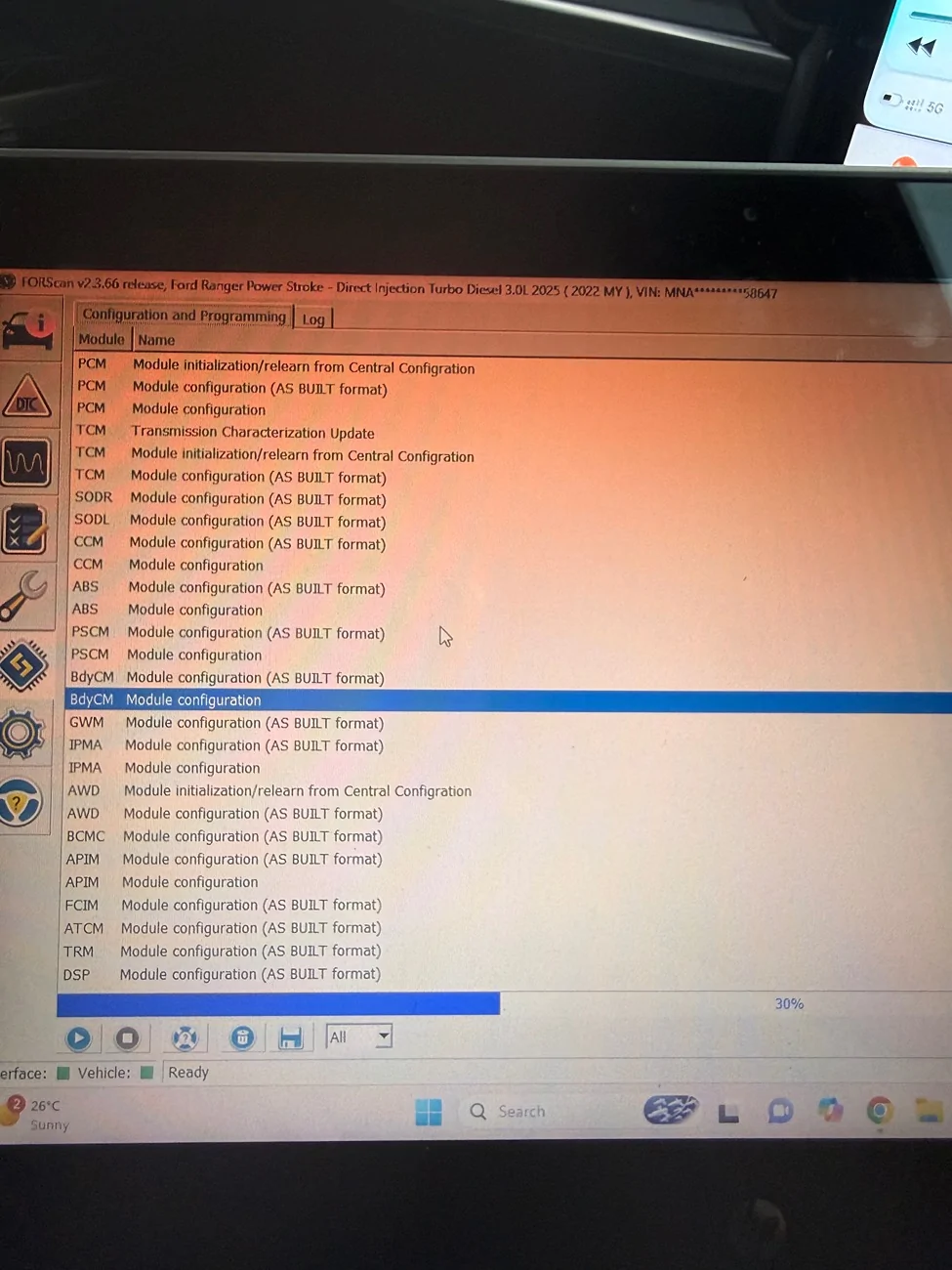
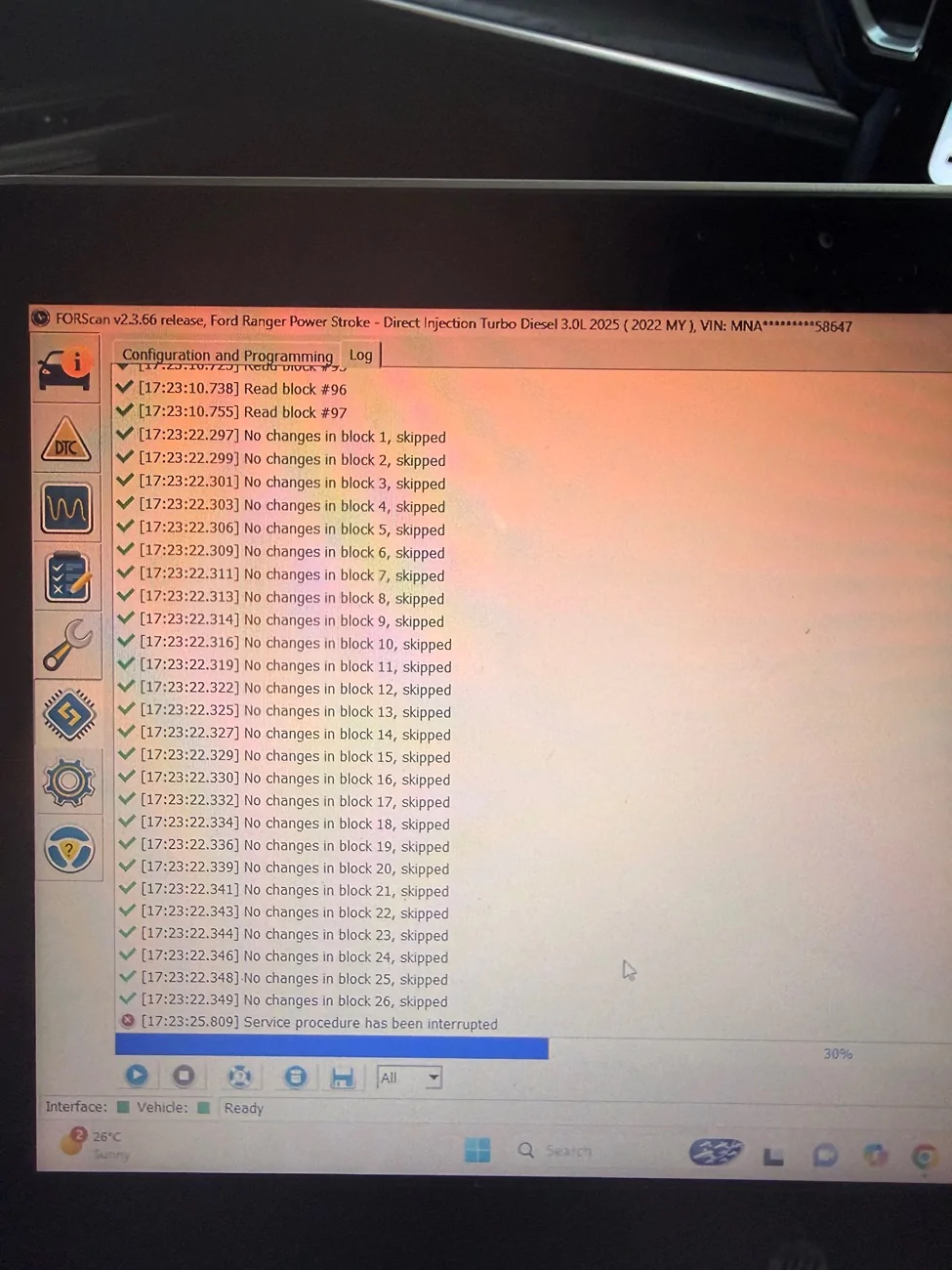
Hey iv recently upgraded my Ranger wildtrak to the 2025 Ranger platinum here in Aus but when writing files in FORScan to the bdycm it loads new changes to 30% then kicks me out of the module says service procedure interrupted and ideas why it’s only that module all others let me write no issues ?

Ford Ranger FORScan NA Ranger 6th Gen (2024+) Crowdsourced Spreadsheet IMG_0662


Ford Ranger FORScan NA Ranger 6th Gen (2024+) Crowdsourced Spreadsheet IMG_0661
 

RCMUSTANG

Well-Known Member
First Name
Ray
Joined
Jan 22, 2019
Threads
2
Messages
1,463
Reaction score
464
Location
Los Angeles
Vehicle(s)
1989 Mustang 2017 Fusion
Hey iv recently upgraded my Ranger wildtrak to the 2025 Ranger platinum here in Aus but when writing files in FORScan to the bdycm it loads new changes to 30% then kicks me out of the module says service procedure interrupted and ideas why it’s only that module all others let me write no issues ?

IMG_0662.webp


IMG_0661.webp
Whenever it does that it means that change is not available on the platform.
 

CarTuner

Well-Known Member
Joined
Feb 18, 2025
Threads
0
Messages
45
Reaction score
25
Location
Australia
Vehicle(s)
Next Gen Supercab Ranger XLT BiTurbo
Hey guys, I have a few questions. You can see to the left here what my Ranger is. I know there wont be much knowledge on it, but crossing my finger's I get SOME answers.
I have finally acquired Forscan. I have now added/enabled the below:

1. 3 x Modes - Mud/Ruts, Sand, Rock Crawl.
2. 3 x Gauges/Temp Readings - Turbo and Oil Pressure, Tire Temp, Power Distribution.
3. Onboard Scales.
4. Trail Turn Assist
5. Offroad Screen

Now these are the questions.

1. No Issues here, except has anyone noticed a difference in offroad performance between Ruts and Rock Crawl? What does the car do differently?

2. There's no pressure showing on either the Turbo or Oil. I just enabled both these gauges in IPC.
I also enabled Axle Oil Temp, Air to Fuel, Cylinder Head Temp but I think these are raptor exclusive.
Also What is Boost Vacuum? Is this another term for the turbo? Do I need to enable Vacuum Gauge Display?

3. Now apparently this is only available in the SuperDuty. However, recently I had a 'notification' pop up on my infotainment screen saying "Overweight". This indicated to me that there was some sort of weight sensing equipment in the back. Therefore, I allowed Onboard Scales in hope of seeing something. It does come up on screen as an option, but it tells me I need to get it serviced or something. My question is, can someone figure out if there's something else we can do to enable this? Unless, there isn't any weight sensing equipment and it just said I was overweight.

4. I enabled this, but can't seem to see anything anywhere. Any ideas?

5. This is working fine, but as stated before, can't see trail turn, and it doesn't have front facing camera. Front cam appears when 4L is engaged though. Something I'm doing wrong?

Also, I haven't touched asbuilts. This is all the standard pages.
Appreciate in advance any answers or help!

I have a few questions about a couple of other options.
Police Dark Mode? What is this? I think there is also Police Dark Car - DRL? Answers pls?😅
Launch Control? I'm guessing this is for Mustang's? Doesn't do anything for Rangers?
What is Cluster Menu in APIM? Is this a different type of layout for the cluster?

Sorry for the overload of questions! Appreciate everyone on here!!!
 

ojebara

New Member
First Name
Omar
Joined
Sep 7, 2025
Threads
0
Messages
3
Reaction score
0
Location
Sydney
Vehicle(s)
next gen platinum ranger
Occupation
vehicle repairer
Whenever it does that it means that change is not available on the platform.
Got the problem fixed forscan sent me a beta version and it worked
 

Mattsraptor 2025

Active Member
First Name
Matt
Joined
Jan 9, 2025
Threads
7
Messages
37
Reaction score
10
Location
Europe
Vehicle(s)
2024 Raptor
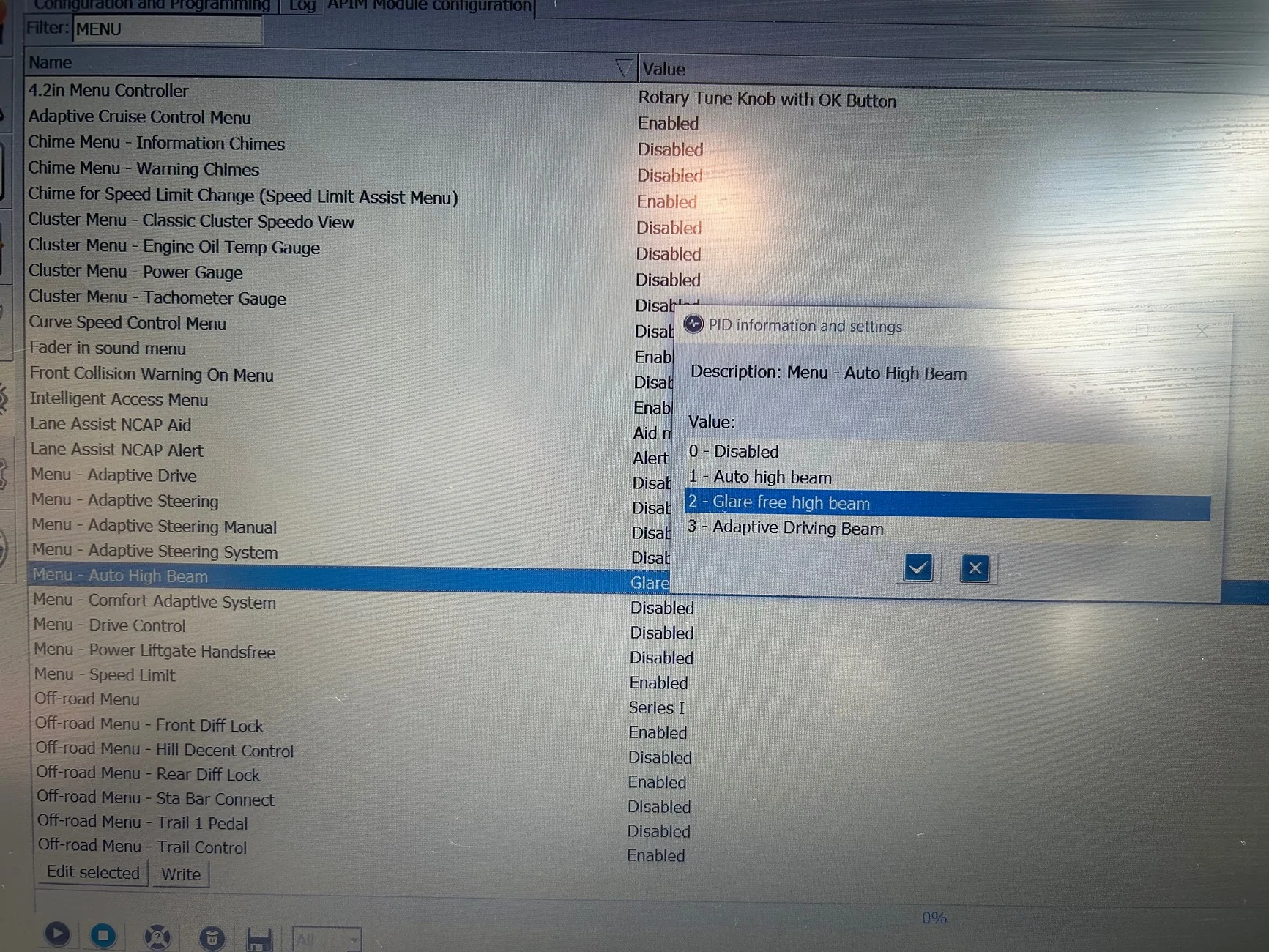
Have been looking at the lighting options on my 2024 RR (IPC).
What are the differences between:
1) Auto High Beam
2) Glare Free High Beam (Current config.)
3) Adaptive Driving Beam

I’m aware of how the GF High Beam works, but how does that compare with Auto HB?
What is Adaptive Driving Beam?

Cheers.

Ford Ranger FORScan NA Ranger 6th Gen (2024+) Crowdsourced Spreadsheet IMG_2136
 
Last edited:

Sponsored

CrustyNoodle

Well-Known Member
First Name
Peter
Joined
Oct 18, 2022
Threads
7
Messages
179
Reaction score
168
Location
Melbourne, Australia
Vehicle(s)
2010 BMW 135i, '19 Rangie Sport, '23 Ranger Raptor
Occupation
Mechanical Engineer
Have been looking at the lighting options on my 2024 RR (IPC).
What are the differences between:
1) Auto High Beam
2) Glare Free High Beam (Current config.)
3) Adaptive Driving Beam

I’m aware of how the GF High Beam works, but how does that compare with Auto HB?
What is Adaptive Driving Beam?

Cheers.

IMG_2136.webp
Changing everything (in SCCM and IPC) over to ADB from GFHB seems to only make the white auto high beam symbol on the dash turn green and stops the blue high beam tell tale from illuminating. Other than that it doesn't do anything.

I don't know what flipping them AHB does as I wasn't interested enough to try that.

Other than these observed changes, nothing else changes and the headlights do the same "matrix" tricks as with GFHB.

Of course my observations are coming from the perspective of an Aus delivered car with all the matrix / GFHB enabled from the factory.

If you don't have this functionality out of the factory then these could well be very interesting settings for you.
 

Mattsraptor 2025

Active Member
First Name
Matt
Joined
Jan 9, 2025
Threads
7
Messages
37
Reaction score
10
Location
Europe
Vehicle(s)
2024 Raptor
Cheers for that.
Think I’ll just leave as is.
Do you have cornering lights and beams that adjust to follow the road ahead as determined by movements in the steering wheel.
Like yours, mine came with GFHB enabled.
 

CrustyNoodle

Well-Known Member
First Name
Peter
Joined
Oct 18, 2022
Threads
7
Messages
179
Reaction score
168
Location
Melbourne, Australia
Vehicle(s)
2010 BMW 135i, '19 Rangie Sport, '23 Ranger Raptor
Occupation
Mechanical Engineer
Yes, I have all that and making those changes to ADB doesn't affect any of it.

And critically, the changes don't fix the issues around activation of the auxiliary circuits (aux 5 / 6 - upfitter switches - whatever you want to call them).
 

ojebara

New Member
First Name
Omar
Joined
Sep 7, 2025
Threads
0
Messages
3
Reaction score
0
Location
Sydney
Vehicle(s)
next gen platinum ranger
Occupation
vehicle repairer
So I’ve recently bought the 2025 Ranger platinum and the approach lighting asbuilt codes in the spreadsheet isn’t applicable to the new model they don’t make them work on the 2025 model but they work on older rangers anyone have updated codes or new block addresses
 

Albanogc

New Member
First Name
Albano
Joined
Sep 16, 2025
Threads
0
Messages
4
Reaction score
17
Location
Brazil
Vehicle(s)
Ranger Black 4x2
Hey guys, I have a few questions. You can see to the left here what my Ranger is. I know there wont be much knowledge on it, but crossing my finger's I get SOME answers.
I have finally acquired Forscan. I have now added/enabled the below:

1. 3 x Modes - Mud/Ruts, Sand, Rock Crawl.
2. 3 x Gauges/Temp Readings - Turbo and Oil Pressure, Tire Temp, Power Distribution.
3. Onboard Scales.
4. Trail Turn Assist
5. Offroad Screen

Now these are the questions.

1. No Issues here, except has anyone noticed a difference in offroad performance between Ruts and Rock Crawl? What does the car do differently?

2. There's no pressure showing on either the Turbo or Oil. I just enabled both these gauges in IPC.
I also enabled Axle Oil Temp, Air to Fuel, Cylinder Head Temp but I think these are raptor exclusive.
Also What is Boost Vacuum? Is this another term for the turbo? Do I need to enable Vacuum Gauge Display?

3. Now apparently this is only available in the SuperDuty. However, recently I had a 'notification' pop up on my infotainment screen saying "Overweight". This indicated to me that there was some sort of weight sensing equipment in the back. Therefore, I allowed Onboard Scales in hope of seeing something. It does come up on screen as an option, but it tells me I need to get it serviced or something. My question is, can someone figure out if there's something else we can do to enable this? Unless, there isn't any weight sensing equipment and it just said I was overweight.

4. I enabled this, but can't seem to see anything anywhere. Any ideas?

5. This is working fine, but as stated before, can't see trail turn, and it doesn't have front facing camera. Front cam appears when 4L is engaged though. Something I'm doing wrong?

Also, I haven't touched asbuilts. This is all the standard pages.
Appreciate in advance any answers or help!

I have a few questions about a couple of other options.
Police Dark Mode? What is this? I think there is also Police Dark Car - DRL? Answers pls?😅
Launch Control? I'm guessing this is for Mustang's? Doesn't do anything for Rangers?
What is Cluster Menu in APIM? Is this a different type of layout for the cluster?

Sorry for the overload of questions! Appreciate everyone on here!!!
Hi mate, I hope you are well.
So I'm stuck in the same spot as you with these gauges.
Turbo and Oil Pressure Activated in IPC, but they don't show any info.
Have you figured out how to make it work?

Mine is a 4x2 so I haven't enabled those modes, but, about Rock Crawl and Ruts, the biggest differences seem to be H and L.

https://media.ford.com/content/ford...selectable-driving-modes-enhance-on--and.html
Sponsored


Top