Sponsored

Forscan Glare Free high beam help

landiscarrier

Well-Known Member
First Name
Landis
Joined
Feb 6, 2026
Threads
3
Messages
170
Reaction score
309
Location
pocono mtns
Vehicle(s)
2025 Ranger Raptor
Occupation
sales
Yeah I can’t wait to test them out. At night they automatically are on?
Yeah they’re auto on. The high beams stay on almost all the time and where it senses other vehicles it just block out or dims those areas. That’s the best I can describe it. Haha.
 

Specularius

Member
First Name
Jody
Joined
May 20, 2026
Threads
2
Messages
13
Reaction score
14
Location
Louisiana
Vehicle(s)
2015 F350 DRW KR, 2026 Ranger Raptor
Occupation
Self Employed
I followed the instructions in the spreadsheet for glare free matrix. I get the option for glare free, but not the option for left or right hand drive. In looking at the forscan data for F150's, I see that the changes are enabling Adaptive Driving Beams, not glare free. There are options to enable ADB's on the Ranger as well as the Glare Free. Could the left and right drive option be tied to the ADB's.
 

badmerc

Member
Joined
May 10, 2026
Threads
1
Messages
15
Reaction score
2
Location
bama
Vehicle(s)
2025 ranger raptor
Enable the ADB and see what happens. Be sure to reboot modules
I have a powerboost that I have enabled glare free on as well. Some of the changes are different from each truck.
 

jrRaptor

Well-Known Member
First Name
Josh
Joined
May 19, 2023
Threads
9
Messages
813
Reaction score
1,107
Location
Maize, KS
Vehicle(s)
24 RRaptor, 93 cobra, 11 CTS-V, 15 GSX-R1000
Occupation
Engineer
Also just FYI, I recall reading somewhere that while driving, for glare free headlights to work, certain conditions must be met. One of them is vehicle speed - must be traveling at minimum 35mph. There are others I think, like exterior light levels. Dusk and dawn level brightness outside may inhibit glare free lights, along with city street lights.

I didn't confirm mine were working until I got out of the city in dark conditions and up to speed. They do work great.
 

Sponsored

badmerc

Member
Joined
May 10, 2026
Threads
1
Messages
15
Reaction score
2
Location
bama
Vehicle(s)
2025 ranger raptor
I did have to drive around for the toggles to pop up
 

landiscarrier

Well-Known Member
First Name
Landis
Joined
Feb 6, 2026
Threads
3
Messages
170
Reaction score
309
Location
pocono mtns
Vehicle(s)
2025 Ranger Raptor
Occupation
sales
I followed the instructions in the spreadsheet for glare free matrix. I get the option for glare free, but not the option for left or right hand drive. In looking at the forscan data for F150's, I see that the changes are enabling Adaptive Driving Beams, not glare free. There are options to enable ADB's on the Ranger as well as the Glare Free. Could the left and right drive option be tied to the ADB's.
I didn’t get the left or right side choice either but mine work spectacularly! It’s interesting driving at night in traffic, your high beams stay on and you’ll see the light pattern change to where other cars are or are not.
 

Jaspah

Active Member
Joined
Oct 12, 2024
Threads
0
Messages
42
Reaction score
61
Location
USA
Vehicle(s)
2024 Ranger Raptor
I did not get the left/right side toggle either, but was able to confirm mine were working. Very cool.
 

pablo94sc

Well-Known Member
Joined
Oct 27, 2023
Threads
41
Messages
1,128
Reaction score
1,134
Location
TN
Vehicle(s)
Focus
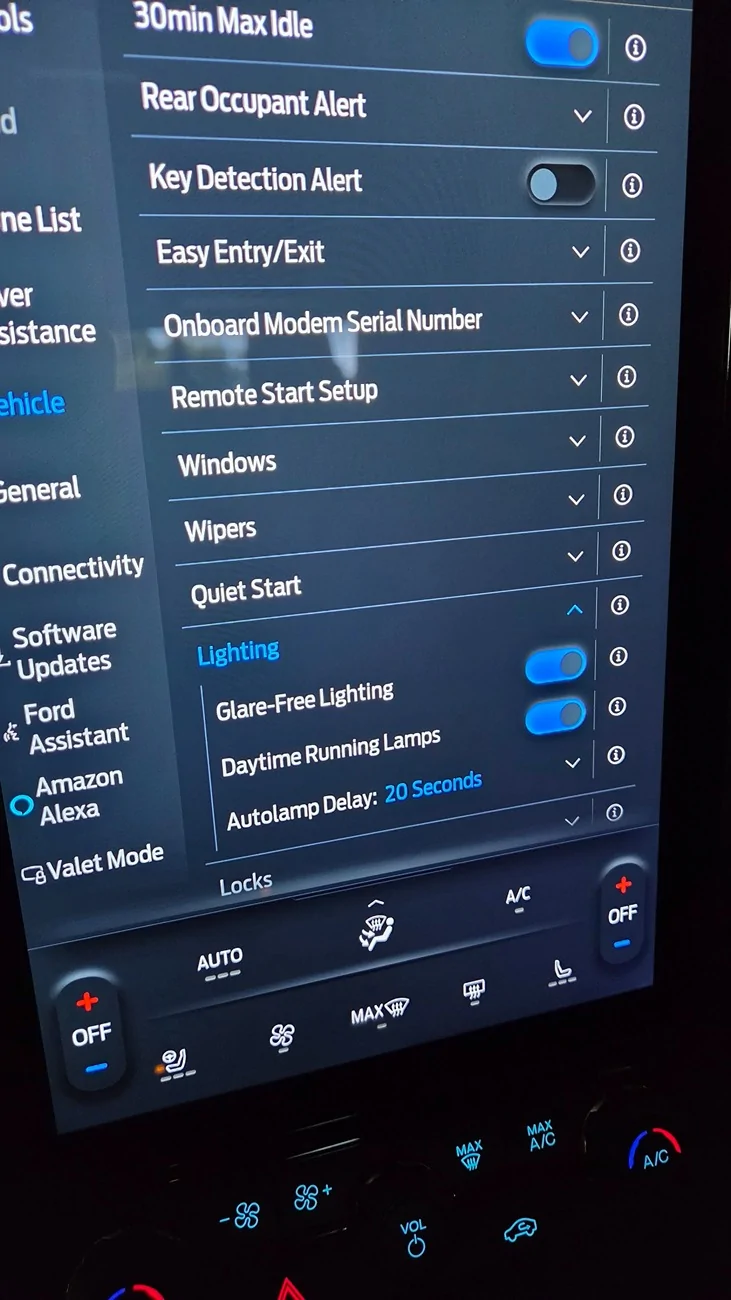
I just turned glare free on. I had a advanced headlight feature not available warning come up after, and had to go into IPC (drop down) to disable both adaptive headlight settings to get it to go away. Still have the road side selection option, and glare free is now under lighting instead of auto high beams.

I'll go driving tonight to see if it took or if I broke something. Haha
 

pablo94sc

Well-Known Member
Joined
Oct 27, 2023
Threads
41
Messages
1,128
Reaction score
1,134
Location
TN
Vehicle(s)
Focus
Update: apparently I either did something wrong, or something I enabled for the adaptive setup is blocking glare free from working.

Before this, auto-high beams had a special white icon on the cluster (next to the headlamp indicator) that turned green when high beams came on. Is there something like this for glare free, and do I need to toggle the high beam/indicator stalk to activate? Making sure I'm not doing something else wrong before going back into FORscan.
 

Sponsored

Switzguy

Well-Known Member
Joined
Nov 30, 2025
Threads
2
Messages
133
Reaction score
185
Location
Minnesota
Vehicle(s)
2025 Ranger Raptor, 2018 BMW M240i
I just enabled mine last night but have yet to test them out.
No errors that I can see.

Ford Ranger Forscan Glare Free high beam help 1786060634623-3o
 
Last edited:

Ag3ntC00p3r

Well-Known Member
Joined
Apr 24, 2024
Threads
6
Messages
405
Reaction score
490
Location
Wisconsin
Vehicle(s)
Ranger Raptor
Occupation
Product Manager
From what I can tell, when it is active it has the white auto headlight selection lit. I just enabled mine today so will try and get drive in a couple hours.

Here are a couple Ford AU pages on Glare Free for Ranger and Everest.

From Everest page:

When the system detects a source of light, the system tracks the vehicle and shuts down individual LEDs to create a “light tunnel” keeping from dazzling the other road user while maintaining the maximum amount of light around it.
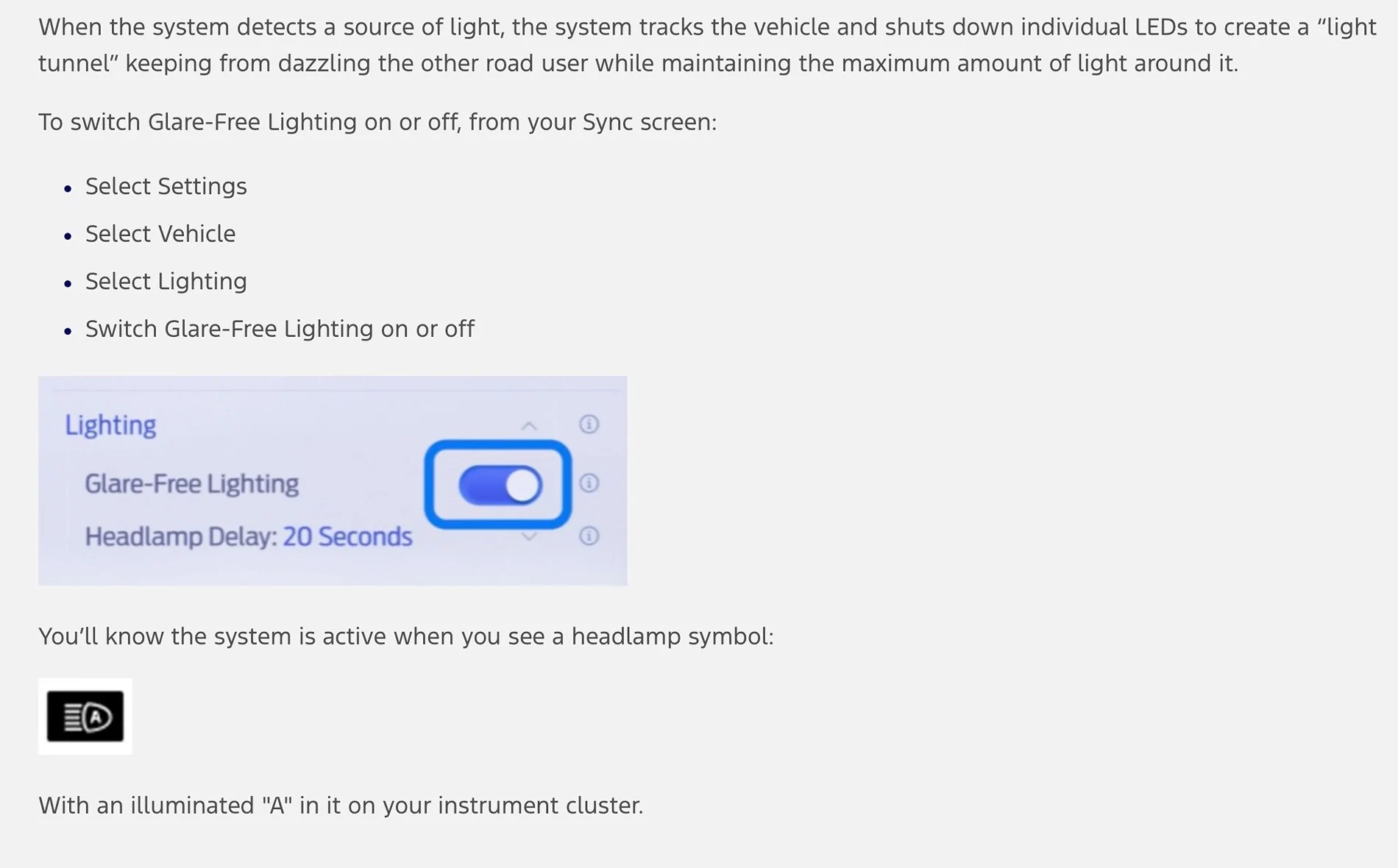
To switch Glare-Free Lighting on or off, from your Sync screen:
  • Select Settings
  • Select Vehicle
  • Select Lighting
  • Switch Glare-Free Lighting on or off

You’ll know the system is active when you see a headlamp symbol:

With an illuminated "A" in it on your instrument cluster.

There might be some situations where you want to override the glare-free high beam. To do that, simply push the lever away from you to activate full high beam, pull the lever towards you to switch them off, and push the lever away from you a third time to switch glare-free lighting back on.

Everest Platinum’s Matrix LED head lamps have two other features. One is high beam boost. Activating at highway speeds (greater than 40km/hr) when the system detects no other traffic (headlamps or tail-lamps) and if the ambient light is low enough, it will provide up to 30 percent more light projecting down the road. This is achieved by activating the ‘dormant’ LEDs in the headlamp offering the extra illumination above the Matrix LED high beam alone.

Ford Ranger Forscan Glare Free high beam help IMG_0012
 

Ag3ntC00p3r

Well-Known Member
Joined
Apr 24, 2024
Threads
6
Messages
405
Reaction score
490
Location
Wisconsin
Vehicle(s)
Ranger Raptor
Occupation
Product Manager
Here is another page that has more details.

https://www.fordservicecontent.com/...A&div=f&vFilteringEnabled=False&buildtype=web

The system is designed to turn the high beams on if all of the following occur:
  • You switched the system on in the information display.
  • You set the lighting control to the autolamps position.
  • The ambient light level is low enough that high beams are required.
  • Your vehicle speed is greater than approximately 25 mph (40 km/h).
The system is designed to adapt the high beams to avoid glare if all of the following occur:
  • You switched the system on in the information display.
  • You set the lighting control to the autolamps position.
  • The system detects an approaching vehicle's headlamps or rear lamps.
Ford Ranger Forscan Glare Free high beam help imagen2
The high beam headlamp indicator remains on when the system adapts the high beams to avoid glare.
The system is designed to turn the high beams off if any of the following occur:
  • You switch the system off in the information display.
  • You set the lighting control to any position except autolamps.
  • You switch the rear fog lamps on.
  • The system detects severe rain, snow or fog.
  • The system detects street lighting.
  • The camera has reduced visibility.
  • Your vehicle speed falls below approximately 19 mph (30 km/h).
  • The deactivation speed is lower on curves.
 

Ag3ntC00p3r

Well-Known Member
Joined
Apr 24, 2024
Threads
6
Messages
405
Reaction score
490
Location
Wisconsin
Vehicle(s)
Ranger Raptor
Occupation
Product Manager
Got out for a drive last night. Seemed to work as intended.

When I got out of town it switched on auto high beams like it did in the past.
The Auto indicator was on and it had the blue high beam indicator on as well.
When I came across another car I could see the driver side lights cut off in the oncoming lane with the shoulder still lit with high beams.
The blue high beam indicator stayed on the whole time.
There was no other change in dash lights to indicate the lights were actively in glare free mode.
Worth mentioning, at no time with oncoming traffic did anyone flash me for high beams/glare.
Once I no longer had oncoming traffic the light pattern changed to the full high beam pattern, again with no change in indicator lights.
Some of the descriptions noted glare free mode would actually be brighter than standard high beam pattern. I toggled the mode on and off while driving and didn't notice any difference.

If you are someone that already uses the auto high beam function, I recommend enabling the glare free mode. If you don't use it I would probably skip it.
 

landiscarrier

Well-Known Member
First Name
Landis
Joined
Feb 6, 2026
Threads
3
Messages
170
Reaction score
309
Location
pocono mtns
Vehicle(s)
2025 Ranger Raptor
Occupation
sales
Got out for a drive last night. Seemed to work as intended.

When I got out of town it switched on auto high beams like it did in the past.
The Auto indicator was on and it had the blue high beam indicator on as well.
When I came across another car I could see the driver side lights cut off in the oncoming lane with the shoulder still lit with high beams.
The blue high beam indicator stayed on the whole time.
There was no other change in dash lights to indicate the lights were actively in glare free mode.
Worth mentioning, at no time with oncoming traffic did anyone flash me for high beams/glare.
Once I no longer had oncoming traffic the light pattern changed to the full high beam pattern, again with no change in indicator lights.
Some of the descriptions noted glare free mode would actually be brighter than standard high beam pattern. I toggled the mode on and off while driving and didn't notice any difference.

If you are someone that already uses the auto high beam function, I recommend enabling the glare free mode. If you don't use it I would probably skip it.
I love the glare free light! I think they work flawlessly! And same, no one has flashed their lights at me.
Sponsored


Top