Sponsored

RCMUSTANG

Well-Known Member
First Name
Ray
Joined
Jan 22, 2019
Threads
2
Messages
1,539
Reaction score
571
Location
Los Angeles
Vehicle(s)
1989 Mustang 2017 Fusion
Thanks

Sure, that works, but I mean something slightly different.
I’m looking for the windows to close automatically with a single normal press of the lock button, without having to press twice and keep holding it.

RA Ranger sells a programmer that enables exactly that function, so I’m trying to find out whether the same setting can be enabled manually with FORScan:
https://raranger.com.au/products/global-close-windows-programmer
Not a Ford feature I've ever heard of.
Sponsored


rgbranger

New Member
Joined
Sep 15, 2026
Threads
0
Messages
4
Reaction score
7
Location
Australia
Vehicle(s)
2025 XLT
Thanks

Sure, that works, but I mean something slightly different.
I’m looking for the windows to close automatically with a single normal press of the lock button, without having to press twice and keep holding it.

RA Ranger sells a programmer that enables exactly that function, so I’m trying to find out whether the same setting can be enabled manually with FORScan:
https://raranger.com.au/products/global-close-windows-programmer
Heya, I think you’re looking for ‘global close’ in the non-as built BCM module.
 
  • Like
Reactions: JJT

CaptAngry

Well-Known Member
Joined
Oct 4, 2022
Threads
13
Messages
433
Reaction score
703
Location
Denver, CO
Vehicle(s)
2026 RRaptor
Occupation
Space Engineer
I enabled the "global close" today in FORScan while I was doing other stuff, just to see if it worked. So far... no. I'm wondering if there is another module I also need to touch?

Looking at the spreadsheet I might also need to touch the DDM and PDM (I only enabled the close in the BCM)
 

RCMUSTANG

Well-Known Member
First Name
Ray
Joined
Jan 22, 2019
Threads
2
Messages
1,539
Reaction score
571
Location
Los Angeles
Vehicle(s)
1989 Mustang 2017 Fusion
I enabled the "global close" today in FORScan while I was doing other stuff, just to see if it worked. So far... no. I'm wondering if there is another module I also need to touch?

Looking at the spreadsheet I might also need to touch the DDM and PDM (I only enabled the close in the BCM)
I'm pretty sure global close only had to do with being able to use the fob by hitting the button twice and holding it down on the second press. I've never heard of it automatically close just by locking.
 

CaptAngry

Well-Known Member
Joined
Oct 4, 2022
Threads
13
Messages
433
Reaction score
703
Location
Denver, CO
Vehicle(s)
2026 RRaptor
Occupation
Space Engineer
Yeah, I get that. I was trying to close via the fob.

I also enabled the DDM/PDM bit and enabled in the APIM menu too.

It is raining now so I'm not going out to test it now :LOL:
 

Sponsored

rgbranger

New Member
Joined
Sep 15, 2026
Threads
0
Messages
4
Reaction score
7
Location
Australia
Vehicle(s)
2025 XLT
It definitely works on my Australian my25. If I leave a window down and lock with the key fob they all close.
My memory is that there’s two options under the global close setting - ‘press and hold’ and ‘single press’. And I don’t remember enabling anything else to get it working.
But- I also have a faint memory that you might need to jump into the settings on the infotainment display to turn it on.
I’ll have a look later today. Something might have changed in the 18 months since I did it.
 

rgbranger

New Member
Joined
Sep 15, 2026
Threads
0
Messages
4
Reaction score
7
Location
Australia
Vehicle(s)
2025 XLT
It definitely works on my Australian my25. If I leave a window down and lock with the key fob they all close.
My memory is that there’s two options under the global close setting - ‘press and hold’ and ‘single press’. And I don’t remember enabling anything else to get it working.
But- I also have a faint memory that you might need to jump into the settings on the infotainment display to turn it on.
I’ll have a look later today. Something might have changed in the 18 months since I did it.
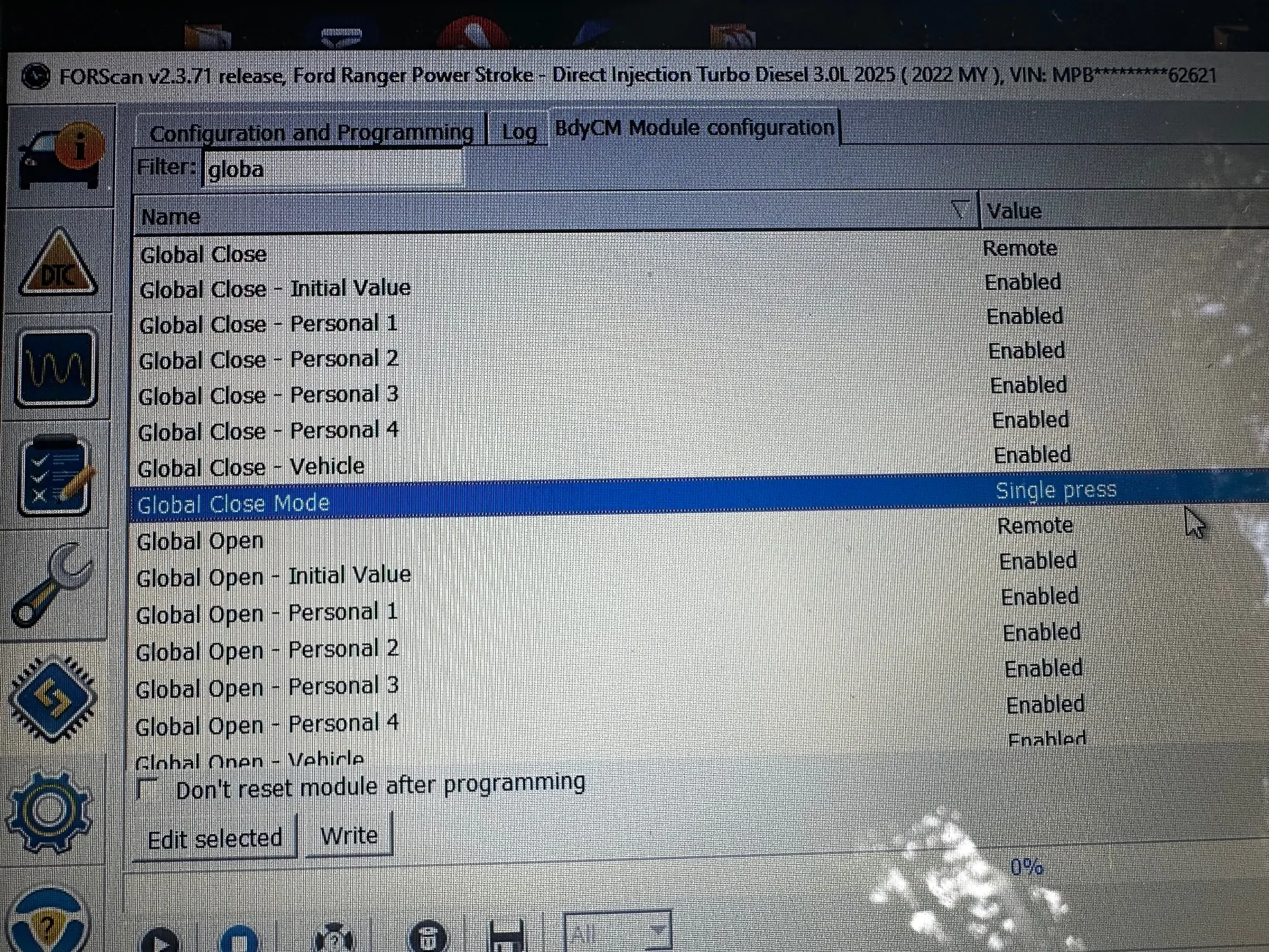
ok- I had a look. There’s ’global close’ which needs to be ‘remote’, and ‘global close mode’ that needs to be ‘single press’.
Let me know how you go!

Ford Ranger FORScan NA Ranger 6th Gen (2024+) Crowdsourced Spreadsheet IMG_1009


Last edited:

CaptAngry

Well-Known Member
Joined
Oct 4, 2022
Threads
13
Messages
433
Reaction score
703
Location
Denver, CO
Vehicle(s)
2026 RRaptor
Occupation
Space Engineer
So I can confirm my double-tap global open AND close now work :thumbsup:

I like the idea of the single press, except then it is harder to leave windows cracked
 
Last edited:

Connman1

Active Member
First Name
Tim
Joined
Feb 5, 2026
Threads
6
Messages
36
Reaction score
38
Location
USA
Vehicle(s)
2026 Ranger Raptor
So I can confirm my double-tap global open AND close now work :thumbsup:

I like the idea of the single press, except then it is harder to leave windows cracked
Can you share were you had found this? I had this on my F350 its a great feature
 

rgbranger

New Member
Joined
Sep 15, 2026
Threads
0
Messages
4
Reaction score
7
Location
Australia
Vehicle(s)
2025 XLT
So I can confirm my double-tap global open AND close now work :thumbsup:

I like the idea of the single press, except then it is harder to leave windows cracked
Glad it worked!

If I want to leave a window cracked while locked then I can use the keyless locking by touching the door handle. The single press window close only happens when using the remote.
👍
 

Sponsored

Hande

Well-Known Member
First Name
Hannu
Joined
Oct 15, 2025
Threads
8
Messages
120
Reaction score
63
Location
Estonia
Vehicle(s)
2025 Ford Ranger Raptor Diesel
Occupation
Business Owner
Perhaps someone has figured this out...
I see that USA RR asks, if you want to return to previous drive mode after-starting of the engine. Unfortunately EU RR does not do the same :(
It shows theprevious drive mode, like black truck when you start up the car, but still uses normal mode at start.
 

CaptAngry

Well-Known Member
Joined
Oct 4, 2022
Threads
13
Messages
433
Reaction score
703
Location
Denver, CO
Vehicle(s)
2026 RRaptor
Occupation
Space Engineer
Can you share were you had found this? I had this on my F350 its a great feature
Once again the web interface is not uploading my pictures (in this case a screenshot)

Basically, I went to the "Features - TBD" sheet and set the DDM/PDM in the as-built, then enabled anything I could find in the APIM and BCM via the non as-built menus.
 

Hande

Well-Known Member
First Name
Hannu
Joined
Oct 15, 2025
Threads
8
Messages
120
Reaction score
63
Location
Estonia
Vehicle(s)
2025 Ford Ranger Raptor Diesel
Occupation
Business Owner
I am trying to solve "Return to previous drive mode" after restarting the engine.

I undestand this is standard in US RR, but unfortunately not so in EU RR.
Even more stupid is, that the drive mode goes always back to regular after restart, but 4WD setting not - I found myself today wondering, why the truck behaves so weird way in turns on tarmac...
It had 4H after driving with Baja mode on the field, after restart it kept 4H but drive mode went to regular o_O

So I really want to activate it and see "Return to Sport?" pop-up in IPC.
What modules might beinvolved? Perhaps someone with US RR could be so kind and take Forscan screenshots of non-asbuilt module lists, so I could check if there is something differently?
 

rugedraw

Well-Known Member
First Name
Javier
Joined
Jan 21, 2026
Threads
0
Messages
69
Reaction score
45
Location
Miami, FL
Vehicle(s)
2021 Ford F150; 2023 Bronco Sport; 1991 Mustang 5.0 coupe.
Occupation
Auto Sales
I am trying to solve "Return to previous drive mode" after restarting the engine.

I undestand this is standard in US RR, but unfortunately not so in EU RR.
Even more stupid is, that the drive mode goes always back to regular after restart, but 4WD setting not - I found myself today wondering, why the truck behaves so weird way in turns on tarmac...
It had 4H after driving with Baja mode on the field, after restart it kept 4H but drive mode went to regular o_O

So I really want to activate it and see "Return to Sport?" pop-up in IPC.
What modules might beinvolved? Perhaps someone with US RR could be so kind and take Forscan screenshots of non-asbuilt module lists, so I could check if there is something differently?
You can pull the ab data from any vehicle with the VIN on Ford's Motorcraft website using the link below. Should be simple enough to find a VIN of a US based vehicle that's posted online for sale.

https://www.motorcraftservice.com/AsBuilt

If what you're looking for is to enable the "return to sport" message on your truck, I would look through the IPC and APIM spreadsheets. On the 2025, it is possible the IPC is managed by the APIM and it does not have a seperate module for the cluster like the first-gen Sync 4 vehicles did.

Also, please note that a lot is defined by the vehicle type and market type when it comes to the APIM. There may not be a bit you can flip to enable that. In some cases, you'd have to change the country code and market type of the vehicle module to gain access to "missing" features.

Good luck.
 

joordan

Well-Known Member
Joined
Apr 22, 2024
Threads
23
Messages
351
Reaction score
160
Location
Italy
Vehicle(s)
ranger wildtrak 2023
I am trying to solve "Return to previous drive mode" after restarting the engine.

I undestand this is standard in US RR, but unfortunately not so in EU RR.
Even more stupid is, that the drive mode goes always back to regular after restart, but 4WD setting not - I found myself today wondering, why the truck behaves so weird way in turns on tarmac...
It had 4H after driving with Baja mode on the field, after restart it kept 4H but drive mode went to regular o_O

So I really want to activate it and see "Return to Sport?" pop-up in IPC.
What modules might beinvolved? Perhaps someone with US RR could be so kind and take Forscan screenshots of non-asbuilt module lists, so I could check if there is something differently?
have been trying to fix this since years, no luck for me...
Sponsored


Top