Sponsored

How to customize center display (Ranger Raptor)?

OxygenMask

Well-Known Member
First Name
Phil
Joined
Feb 20, 2026
Threads
8
Messages
492
Reaction score
920
Location
Eugene, Oregon
Vehicle(s)
2025 Ranger Raptor
Occupation
Retired
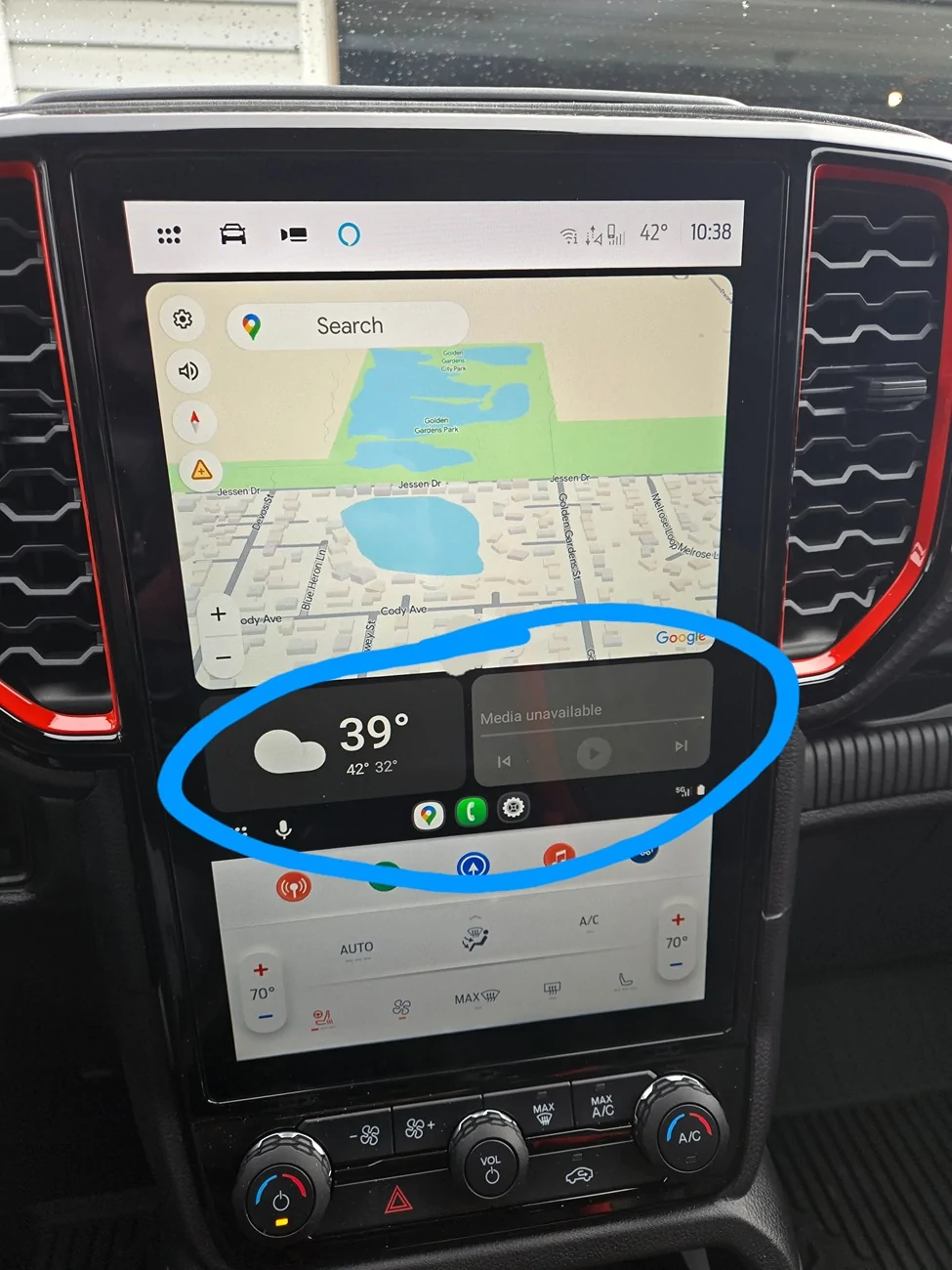
I have looked at settings, read the owner's manual, googled etc... can I change what is displayed on the center screen (circled in photo?) I don't need the weather (I have windows to see the weather...) and don't even understand what is "media" exactly. I mostly use Sirius radio, I want THAT displayed when I'm on Nav. Seems like that would be media....
Boomer here so simply explained help would be appreciated...

Ford Ranger How to customize center display (Ranger Raptor)? 1000014292
Sponsored


Havasu RR

Well-Known Member
First Name
Craig
Joined
Mar 9, 2025
Threads
7
Messages
209
Reaction score
249
Location
Lake Havasu, AZ.
Vehicle(s)
Long travel Tacoma with ranger raptor on order
Occupation
Entrepreneur
I have looked at settings, read the owner's manual, googled etc... can I change what is displayed on the center screen (circled in photo?) I don't need the weather (I have windows to see the weather...) and don't even understand what is "media" exactly. I mostly use Sirius radio, I want THAT displayed when I'm on Nav. Seems like that would be media....
Boomer here so simply explained help would be appreciated...
1000014292.webp
To make that navigation screen go full screen, just touch the Google navigation button one more time and then it will occupy the entire space and get rid of those two smaller screens
 
OP
OP
OxygenMask

OxygenMask

Well-Known Member
First Name
Phil
Joined
Feb 20, 2026
Threads
8
Messages
492
Reaction score
920
Location
Eugene, Oregon
Vehicle(s)
2025 Ranger Raptor
Occupation
Retired
I don't necessarily want to get rid of them, I want to choose what is displayed there.
I have been all over my phone settings, but nothing changes them.
 

RCMUSTANG

Well-Known Member
First Name
Ray
Joined
Jan 22, 2019
Threads
2
Messages
1,462
Reaction score
462
Location
Los Angeles
Vehicle(s)
1989 Mustang 2017 Fusion
I don't necessarily want to get rid of them, I want to choose what is displayed there.
I have been all over my phone settings, but nothing changes them.
I believe you have to make those changes in the app itself when not connected to the truck. Open it on your phone while not connected and go to settings. There you can toggle on or off some of the default apps connected to the android auto.
 

Sponsored

nate.co

Well-Known Member
First Name
Nate
Joined
Sep 1, 2023
Threads
9
Messages
151
Reaction score
313
Location
Lafayette, Colorado, USA
Vehicle(s)
2024 Ranger Raptor, Polestar 2
Short answer is no.

I would change the Ford UI to "dark mode" in settings in the truck so that it fits better visually with Android Auto, but that's just me.

That center section is Android Auto. In this form factor of screen it will always show a nav app on top (Google Maps, Waze, OnX, etc) and then below is always the weather on the left and whatever media you were playing (YouTube Music, Audible, etc) on the right. Can't really change that.

You can only show the map, just click the map app in the app list and it'll go "full screen" vs showing those widgets.

There's no way to show the radio station from the truck, that info doesn't make it into Android Auto (or Apple CarPlay if you're an iOS person).

Settings for Android Auto are fun to find on the phone. Go to System Settings (gear icon), then search for "Android Auto" and click on it in the "Apps" section of search. You can't just go to the Android Auto app because it's hidden. Once you click on Android Auto in settings search, you'll be in the "App info" screen, click on "Additional settings in the app". Here you can see what cars are registered, select what apps to show in the app list in the car, etc, but notably you can't change those widgets etc.
 
OP
OP
OxygenMask

OxygenMask

Well-Known Member
First Name
Phil
Joined
Feb 20, 2026
Threads
8
Messages
492
Reaction score
920
Location
Eugene, Oregon
Vehicle(s)
2025 Ranger Raptor
Occupation
Retired
I believe you have to make those changes in the app itself when not connected to the truck. Open it on your phone while not connected and go to settings. There you can toggle on or off some of the default apps connected to the android auto.
Yeah I've found those settings, but no solution.

Short answer is no.

I would change the Ford UI to "dark mode" in settings in the truck so that it fits better visually with Android Auto, but that's just me.

That center section is Android Auto. In this form factor of screen it will always show a nav app on top (Google Maps, Waze, OnX, etc) and then below is always the weather on the left and whatever media you were playing (YouTube Music, Audible, etc) on the right. Can't really change that.

You can only show the map, just click the map app in the app list and it'll go "full screen" vs showing those widgets.

There's no way to show the radio station from the truck, that info doesn't make it into Android Auto (or Apple CarPlay if you're an iOS person).

Settings for Android Auto are fun to find on the phone. Go to System Settings (gear icon), then search for "Android Auto" and click on it in the "Apps" section of search. You can't just go to the Android Auto app because it's hidden. Once you click on Android Auto in settings search, you'll be in the "App info" screen, click on "Additional settings in the app". Here you can see what cars are registered, select what apps to show in the app list in the car, etc, but notably you can't change those widgets etc.
Awesome answer, thank you! That all makes perfect sense.
Never been a fan of dark mode on my phone, but I'll check it out in the truck.

One thing I wish the center display offered is larger default font. Such a nice screen and so much real estate yet the clock or the Hvac controls are so tiny and hard to see while driving...
 

Granite Stater

Active Member
First Name
Brian
Joined
Dec 20, 2025
Threads
1
Messages
37
Reaction score
78
Location
TX, USA
Vehicle(s)
2025 Lariat FX4, 2.7
Occupation
Operations Manager
If you tap that orange music note icon above the A/C controls it should display the radio and station presets, including Sirius XM.
 

NM Mike

Well-Known Member
First Name
Mike
Joined
Jan 4, 2026
Threads
6
Messages
256
Reaction score
452
Location
New Mexico
Vehicle(s)
25 Ranger XLT FX4. 99 Superduty XLT Powerstroke 4X4, 71 F250 custom 4x4
I
Awesome answer, thank you! That all makes perfect sense.
Never been a fan of dark mode on my phone, but I'll check it out in
I’m not a fan of dark mode on my phone either, but I prefer it on the center console. Might give it a try snd see if you like it.
Sponsored


Top